

How I Cut Manual Operations by 80% for an Enterprise Client Using AI Automation
In 2026, about 88% of enterprises run AI automation in at least one part of the business, yet only around a third have taken it past that first use case, according to AppVerticals’ AI Automation Statistics for Enterprises report (retrieved 2026-08-22). Most companies stall somewhere in that gap, with a tool switched on and no clear count of the hours it gave back. This AI automation case study covers one enterprise client that pushed through it.
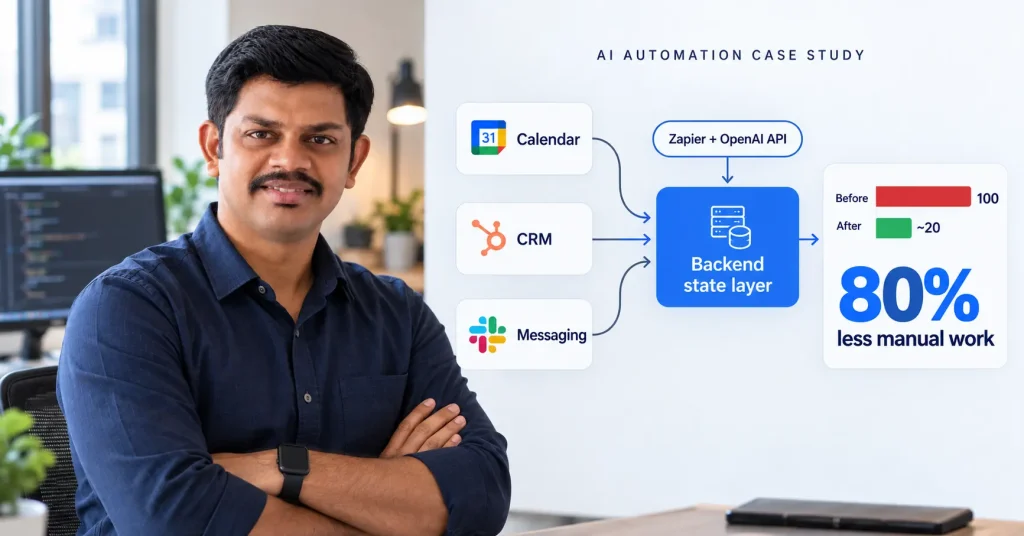
At Manomay Informatics I built automation for an enterprise client that cut their manual operations by 80%. This AI automation case study walks through where that number came from: the manual work the team did before, and the point where a plain no-code setup would have run out of road.
I am Prashant Singh. I build backends and AI automation for startups and enterprise teams from Kanpur, India, and I have been shipping production code since 2014. Every figure in this post comes from my own project work, and I can stand behind each one.
Key Takeaways
- The client’s calendar app, CRM, and messaging tool were kept in sync by hand every working day. That coordination work fell by about 80% once the automation was live.
- Most of the result came from a small backend service that held one version of each record across the three tools. The AI model did a smaller part of the job.
- Zapier moved data between the tools. OpenAI’s API read incoming messages and drafted the routine replies that used to need a person.
- In 2026, well-run business process automation returns a median 300 to 330% over three years and cuts operating costs by about 35% (Softobiz, 2026).
- Work of this size usually pays back inside 6 to 18 months when the process is picked with care.
What does an 80% cut in manual operations actually mean here?
It means the client’s team spent about 80% less time each week moving information between their calendar app, CRM, and messaging tool by hand. In 2026, enterprises that run automation across three or more departments save an average of $4.6 million a year, according to Orbilontech’s AI Automation Stats report (retrieved 2026-07-22). This client was smaller than that, so the saving showed up as staff hours returned rather than a headline dollar figure.
Before I quote any percentage, I measure the starting point. We logged how long the operations staff spent on the repeat coordination tasks, every day, for two weeks. That became the baseline. The 80% is the drop against those logged hours after the automation went live. It is a measured figure, checked again a month later.
I have seen automation projects quote a percentage with no baseline behind it. When you ask how the number was reached, the answer gets vague. When a figure cannot be traced back to a before-and-after log, it is a marketing line, and I do not use those.
What was the client doing by hand before the automation?
The team was the glue between three systems that did not talk to each other. In 2026, nearly 60% of AI leaders name integration with existing systems as a main barrier to adopting automation, according to Deloitte’s AI adoption pulse check published 15 September 2025 (retrieved 2026-08-22). This client was living that problem well before anyone called it an automation project.
Here is how a single booking moved through their day. A slot got set in the calendar app. A staff member copied the details into the CRM. Someone else sent a confirmation through the messaging tool. If a time changed later, all three had to be touched again, in the right order. Miss one and the customer got a reminder that no longer matched reality.
The work was simple and it ran every working day. A large part of the morning went into reconciling what had shifted overnight. Nobody enjoyed it, and it was the kind of task where a small mistake reached a customer directly.
Why couldn’t a plain no-code setup handle this?
A no-code tool can pass data from one app to another when something happens. It struggles to hold the answer to what is true about a record when three systems disagree. In 2026, only about a third of enterprises that adopt AI automation scale it past the first use case, and just 39% report a measurable profit impact, according to AppVerticals’ AI Automation Statistics for Enterprises report (retrieved 2026-08-22). A lot of that stall comes from workflows that need judgement a connector cannot store.
The trigger logic on this project was easy. A calendar event changes, push an update to the other tools. Zapier does that well and I used it for exactly that. The hard part was the daily reconciliation. When the CRM said one thing, the calendar said another, and a staff member had left a note in the messaging tool, something had to decide which version won. A connector has nowhere to keep that rule.
That is why the project needed a developer. The reconciliation rule had to live in code, where it would run the same way every time. The client had tried wiring the tools together before I came in. It worked for the simple pushes and then broke on the first schedule change that touched all three systems at once.
How I built the automation
I put a small backend service between the three tools. It held one record per booking, and every tool read from it and wrote back to it. Zapier handled the movement of data on top of that service. OpenAI’s API read the free-text messages coming in and drafted the routine replies that used to need a person at a keyboard.
The state layer was the core of it. When a booking changed, the change was written to the backend first, and then pushed out to the calendar app, the CRM, and the messaging tool from that single source. The rule for which system wins in a conflict was written down and lived in code, so it applied the same way every time.
The AI part was smaller than people expect. It read an incoming message, pulled out the booking reference and the change being requested, and turned that into a structured update the backend could apply. Anything it was unsure about went to a staff member. Everything routine passed straight through. I have written before about wiring Google Calendar into a Laravel backend and about reading and filtering mail through an API, and both pieces of that work fed this project.

Build time was a few weeks, most of it spent on the reconciliation rules rather than on the AI calls. The model integration was a couple of days of work. Getting the conflict handling right, so the automation could be trusted to run without a person watching it, took the bulk of the schedule. Keeping the background workers alive is its own small job, and I have written up running Supervisor on an AWS box for that part.
What the 80% reduction looked like in numbers
Against the two-week baseline set for this AI automation case study, the logged coordination time fell by about 80%, and it held there when we checked a month later. The staff hours went back into work that needed a person. In 2026, business process automation of this kind typically pays for itself within 6 to 18 months, according to Softobiz’s Business Process Automation ROI Statistics report (retrieved 2026-07-22). This project sat at the faster end of that range because it targeted one clearly defined workflow.
The same shape of result has shown up on other projects I have run, where the fix was a real backend under the automation with connectors doing the simple data movement on top. Here is how four of them measured out, with numbers I can defend.
| Project | What was manual | Before | After |
|---|---|---|---|
| Manomay Informatics | Coordination across calendar app, CRM and messaging tool | Fully manual, every working day | About 80% less coordination time |
| Cityfurnish | Invoicing reconciled against a daily-changing rental schedule | Manual invoice checks | Automated pipeline on Zoho CRM |
| Envate | Stripe and Zoom steps in the core product flow | Slower manual handoffs | 60% faster on the flows users cared about |
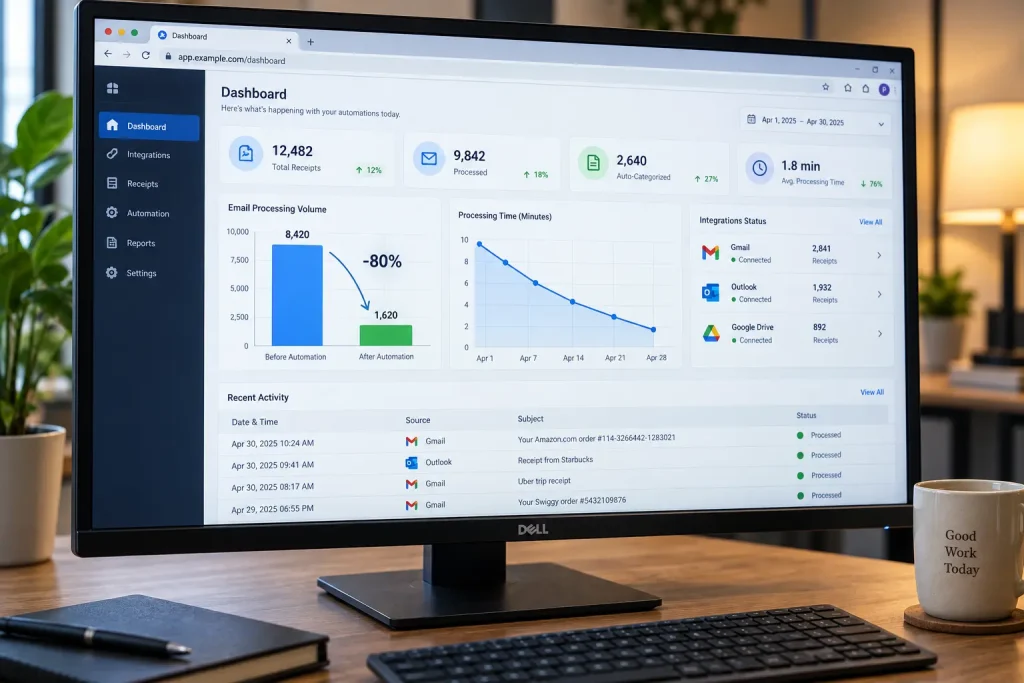
| AMRIOP | Filing and categorising receipts by hand | 4 to 5 manual steps per receipt | 0 steps after a one-time permission at signup |
Each one was built as custom work from the start, because the requirements were already past what a connector could hold on its own.
Where the same pattern showed up on other client work
The clearest parallel to this AI automation case study was Cityfurnish, a furniture rental platform where I built automated invoicing on top of Zoho CRM. The trigger logic took an afternoon. Reconciling invoice state against a rental schedule that changed every day took much longer, and no off-the-shelf connector was going to manage that piece by itself.
At Envate, the work was integrating Stripe and Zoom into the core product flow, which delivered a 60% speed improvement on the steps users ran most often. At AMRIOP, a digital receipt product, receipts were fetched and filed automatically after a single mailbox permission granted at signup, and the manual steps per receipt dropped from four or five to zero.
If you want the longer version of why the backend matters this much, I have written a separate piece on the signs a backend cannot support the automation you want, and another on what custom automation costs against a no-code freelancer.
What this AI automation case study means for your own project
Start by measuring the manual work you want gone. Pick one process, log the hours it eats for two weeks, and use that as your baseline. In 2026, MIT’s Project NANDA report put the share of generative AI pilots with no measurable profit impact at 95%, based on 52 executive interviews and analysis of 300 deployments, as reported in August 2025 (retrieved 2026-08-22). The study has been criticised for its short window, so hold the exact figure loosely. The pilots that do work tend to be the ones that started with a clear before number.
A no-code tool is the right call when you have one or two simple workflows at low volume, and the data is not something a wrong value would hurt. For a job like routing form entries into a CRM, hiring a developer would be over-engineering, and I would say so.
You need a backend under the automation once the workflow holds state across several systems, or once a rule exists that connectors cannot express. Data you cannot afford to get wrong pushes you the same way. Whichever tool you land on, start from the measured baseline, so a year later you can say plainly whether the work paid for itself.
Frequently Asked Questions
How was the 80% reduction measured?
We logged the operations team’s time on the repeat coordination tasks for two weeks before any work started. The 80% is the drop against those recorded hours after the automation went live, and we checked it again a month later.
Which tools were used for the automation?
Zapier moved data between the client’s calendar app, CRM, and messaging tool. OpenAI’s API read incoming messages and drafted routine replies. A custom backend service held one version of each record so the three systems stayed in agreement.
Could this have been done with only no-code tools?
Partly. The data movement was straightforward in Zapier. The daily reconciliation, deciding which system was right when they disagreed, needed real code and a place to store that rule. A connector on its own had nowhere to keep it.
How long did the project take to pay back?
Business process automation of this size usually pays back within 6 to 18 months when the process is chosen well (Softobiz, Business Process Automation ROI Statistics 2026). This project sat at the faster end because it targeted one clearly defined workflow.
Does this AI automation case study apply to every business?
No. It reflects one enterprise client with heavy daily coordination across three disconnected systems. A business with one simple workflow will see a smaller absolute saving, though the habit of measuring the baseline first still holds.
Want to see where your team is losing hours?
Send me a short note about the manual work you want gone. I will tell you honestly whether it needs a custom build or whether a no-code tool will do the job on its own. If your process is simple enough that you do not need me, I will say that too.
Book a free demo call and we can look at your setup together.
Sources
- AppVerticals, “AI Automation Statistics for Enterprises (2026): ROI, Adoption, Costs & Trends,” retrieved 2026-08-22
- Softobiz, “Business Process Automation ROI Statistics: 2026 Report,” retrieved 2026-07-22
- Orbilontech, “AI Automation Stats 2026: 25 Powerful Numbers to Know Now,” retrieved 2026-07-22
- Deloitte, “AI trends: Adoption barriers and updated predictions,” 15 September 2025, retrieved 2026-08-22
- MIT Project NANDA, “The GenAI Divide: State of AI in Business 2025,” as reported August 2025, retrieved 2026-08-22
Prashant Singh is a web, mobile, and AI developer based in Kanpur, Uttar Pradesh, with over 10 years of experience building production backends and AI automation for clients across India, the US, UK, and Australia. The client numbers in this AI automation case study come from his own projects at Manomay Informatics, Cityfurnish, Envate, and AMRIOP, and are verified as of 2026-09-07.