

Coding Challenge: Typescript Interview Questions 2026 – Part 2

Overview

It’s common for a web developer to go through a coding challenge round in his interview process. In this blog article, I will cover a few typical coding challenges that you may face in any technical interview round when looking for a job. As the popularity of Typescript is growing nowadays I am going to provide you with some popular TypeScript interview questions and their solutions that will help you in cracking the interview.

Coding Challenges

  1. Create a function that takes in an array of numbers and returns the sum of all the even numbers in the array.
  2. Implement a function that takes in a number and returns the factorial of that number.
  3. Implement a function that checks if a given string is a palindrome (i.e. reads the same backward and forward).
  4. Write a function that takes in a string and returns the number of vowels in the string.
  5. Create a function that takes in an array of numbers and returns a new array with all the values doubled.
  6. Write a function that takes in an array of strings and returns the longest string in the array.
  7. Implement a function that takes in a string and capitalizes the first letter of each word in the string.
  8. Create a function that takes in an array of numbers and returns the second largest number in the array.
  9. Write a function that takes in two arrays of numbers and returns a new array with the sum of each pair of corresponding elements.
  10. Create a function that takes in an array of numbers and returns the largest and smallest numbers in the array.

Also Read: Typescript Technical Interview Questions 2026 – Part 1

Solutions

1. Create a function that takes in an array of numbers and returns the sum of all the even numbers in the array.

function sumOfEvenNumbers(numbers: number[]): number {
    let sum = 0;
    for (let i = 0; i < numbers.length; i++) {
      if (numbers[i] % 2 === 0) {
        sum += numbers[i];
      }
    }
    return sum;
  }
  
  // Example usage
  const numbers = [1, 5, 12, 6, 9, 8, 21, 28, 17, 4];
  const sumOfEvens = sumOfEvenNumbers(numbers); // Returns 58
  console.log("Sum of even numbers is: "+sumOfEvens);

Output

The output of Sum of even numbers
The output of the Sum of even numbers

2. Implement a function that takes in a number and returns the factorial of that number.

function factorial(num: number): number {
  if (num === 0 || num === 1) {
    return 1;
  }
  let result = 1;
  for (let i = 2; i <= num; i++) {
    result *= i;
  }
  return result;
}

// Example usage
let num = 5;
let factorialNum = factorial(num); // Returns 120
console.log("The factorial of "+num+" is: "+factorialNum);
num = 11;
factorialNum = factorial(num); // Returns 39916800
console.log("The factorial of "+num+" is: "+factorialNum);

Output

The output of the factorial of a given number

Also Read: Javascript Interview Questions For Frontend Developers 2024 – Part 1


3. Implement a function that checks if a given string is a palindrome (i.e. reads the same backward and forward).

function isPalindrome(str: string): boolean {
  str = str.toLowerCase();
  for (let i = 0; i < Math.floor(str.length / 2); i++) {
    if (str[i] !== str[str.length - 1 - i]) {
      return false;
    }
  }
  return true;
}

// Example usage
const str1 = 'racecar';
const str2 = 'Prashant';
const isStr1Palindrome = isPalindrome(str1); // Returns true
const isStr2Palindrome = isPalindrome(str2); // Returns false
console.log(str1+" is a palindrome? "+isStr1Palindrome);
console.log(str2+" is a palindrome? "+isStr2Palindrome);

Output

Check whether the given string is a palindrome

4. Write a function that takes in a string and returns the number of vowels in the string.

function countVowels(str: string): number {
  const vowels = ['a', 'e', 'i', 'o', 'u'];
  let count = 0;
  for (let i = 0; i < str.length; i++) {
    if (vowels.indexOf(str[i].toLowerCase())>=0) {
      count++;
    }
  }
  return count;
}

// Example usage
let str = 'Education';
let numVowels = countVowels(str); // Returns 5
console.log({'Given String':str, 'Total number of vowels':numVowels});

str = 'Prashant Singh';
numVowels = countVowels(str); // Returns 3
console.log({'Given String':str, 'Total number of vowels':numVowels});

Output

The output of total number of vowels in a given string

5. Create a function that takes in an array of numbers and returns a new array with all the values doubled.

function doubleArrayValues(numbers: number[]): number[] {
  const doubledNumbers = [];
  for (let i = 0; i < numbers.length; i++) {
    doubledNumbers.push(numbers[i] * 2);
  }
  return doubledNumbers;
}

// Example usage
const numbers = [7,13,5,21,64,39];
const doubledNumbers = doubleArrayValues(numbers); // Returns [14, 26, 10, 42, 128, 78]
console.log(doubledNumbers);

Output

The output of a method that doubles the values of an array and put them in a new array.

Also Read: Laravel Image Resize Project in 10 Minutes


6. Write a function that takes in an array of strings and returns the longest string in the array.

function findLongestString(strings: string[]): string {
  let longestString = '';
  for (let i = 0; i < strings.length; i++) {
    if (strings[i].length > longestString.length) {
      longestString = strings[i];
    }
  }
  return longestString;
}

// Example usage
const strings = ['Prashant', 'Sushant', 'Siddhant', 'Ramakant','Vedant'];
const longestString = findLongestString(strings); // Returns 'Prashant'
console.log({'Input Array':strings,'The longest string in the given array is':longestString});

Output
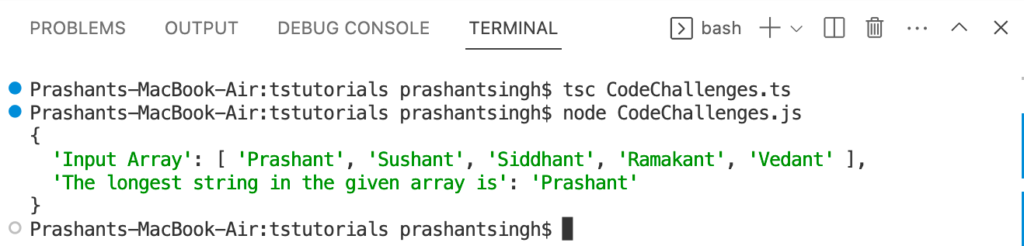
The output of finding the longest string in the given array

7. Implement a function that takes in a string and capitalizes the first letter of each word in the string.

function capitalizeWords(str: string): string {
  const words = str.split(' ');
  const capitalizedWords = [];
  for (let i = 0; i < words.length; i++) {
    capitalizedWords.push(words[i][0].toUpperCase() + words[i].slice(1));
  }
  return capitalizedWords.join(' ');
}

// Example usage
const str = 'now I can crack the typescript codding challanges';

// Returns 'Now I Can Crack The Typescript Codding Challanges'
const capitalizedStr = capitalizeWords(str); 

console.log({'Input String':str,'Converted Capitalize String':capitalizedStr});

Output
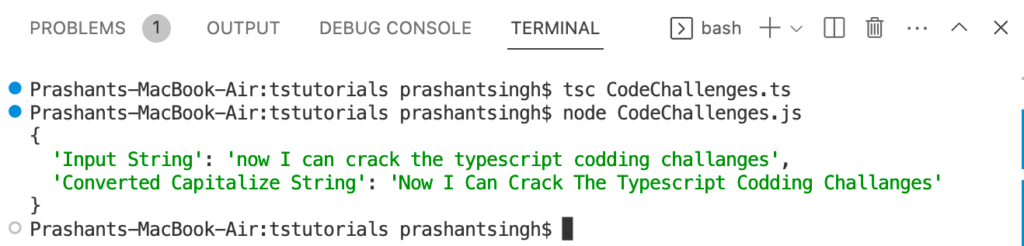
The output of converting a string into capitalize form i.e. making 1st character of the string in upper case

8. Create a function that takes in an array of numbers and returns the second largest number in the array.

function findSecondLargestNumber(numbers: number[]): number {
  let largest = numbers[0];
  let secondLargest = NaN;
  for (let i = 1; i < numbers.length; i++) {
    if (numbers[i] > largest) {
      secondLargest = largest;
      largest = numbers[i];
    } else if (numbers[i] > secondLargest && numbers[i] !== largest) {
      secondLargest = numbers[i];
    }
  }
  return secondLargest;
}

// Example usage
const numbers = [5, 3, 8, 1, 9, 2, 7, 4, 6];
const secondLargest = findSecondLargestNumber(numbers); // Returns 8
console.log({'Input Array': numbers,'Second largest number in the array is':secondLargest});

Output
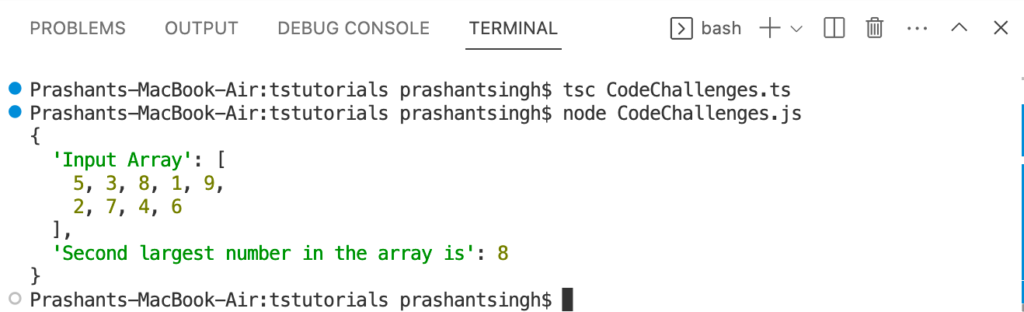
The output of finding the second-largest number in a given array

Also Read: Create Short URL Hashing & Tracking Project in 10 Minutes


9. Write a function that takes in two arrays of numbers and returns a new array with the sum of each pair of corresponding elements.

function sumArrays(arr1: number[], arr2: number[]): number[] {
  const result = [];
  if(arr1.length != arr2.length){
    if(arr1.length > arr2.length){
      for (let i = 0; i < (arr1.length-arr2.length); i++) {
        arr2.push(0); // Making arr2 length equal to arr1 by adding 0 to the arr2
      }
    }else{
      for (let i = 0; i < (arr2.length-arr1.length); i++) {
        arr1.push(0); // Making arr1 length equal to arr2 by adding 0 to the arr2
      }
    }
  }
  for (let i = 0; i < arr1.length; i++) {
    result.push(arr1[i] + arr2[i]);
  }
  return result;
}

// Example usage
const arr1 = [6, 57, 89, 28, 79];
const arr2 = [35, 46, 12, 44, 84,62];
const sumArray = sumArrays(arr1, arr2); // Returns [41, 103, 101, 72, 163, 62]
console.log({'Input Array 1':arr1,'Input Array 2': arr2,'Sum of each pair of corresponsing values':sumArray});

Output
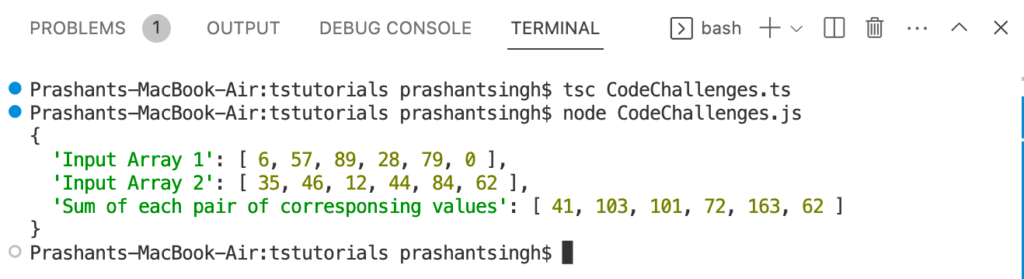
The output of getting the sum of each pair of corresponding values of 2 given arrays.

10. Create a function that takes in an array of numbers and returns the largest and smallest numbers in the array.

function findMinMax(numbers: number[]): { min: number, max: number } {
  let min = numbers[0];
  let max = numbers[0];
  for (let i = 1; i < numbers.length; i++) {
    if (numbers[i] < min) {
      min = numbers[i];
    } else if (numbers[i] > max) {
      max = numbers[i];
    }
  }
  return { min, max };
}

// Example usage
const numbers = [5, 3, 8, 1, 9, 2, 7, 4, 6];
const { min, max } = findMinMax(numbers); // Returns { min: 1, max: 9 }
console.log({Input:numbers});
console.log({Minimum:min});
console.log({Maximum:max});

Output
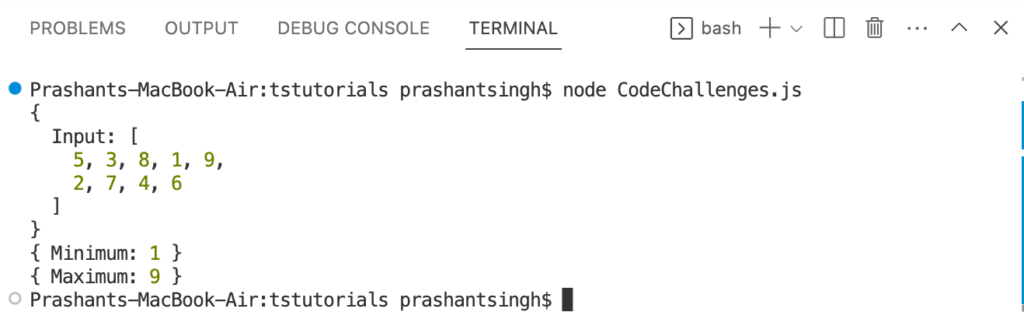
The Output of finding the minimum and maximum value in an array

Also Read: Top 10 Python Skills to Make Money in 2023


Conclusion

These are a few coding challenges that you may face in your next technical interview round. It’s crucial to have logical control over the programming to resolve actual issues.
VS Code Extensions For PHP, CodeIgniter 4, Laravel 11, WordPress

Are you tired of paying for expensive IDEs like PHPStorm, but still want the same functionality for your PHP development needs? Look no further than Visual Studio Code! With just a few VS Code Extensions, you can transform Visual Studio Code into the ultimate PHP development IDE, rivaling even the most expensive IDEs out there.

Install The “PHP Intelephense” Extension By “Ben Mewburn”

The first step is to install the “PHP Intellisense” extension, which provides you with code completion, parameter hints, and other PHP-specific features. With this extension, you can write code with ease, speed, and precision, giving you the ultimate coding experience.

Add The “Php Debug” Extension By “Xdebug”

Next up is the “PHP Debug” extension. This extension will allow you to debug your PHP code right within Visual Studio Code. It saves you time by letting you pinpoint and fix issues in real-time, making the debugging process a breeze.

Install The “Laravel Intelephense” Extension By “Porfia”

For intelligent code completion in Laravel, the “Laravel Intelephense” extension is one of the must-have extensions. Laravel Intelephense for Visual Studio Code is all in one (laravel blade snippets, laravel goto view, laravel goto components, laravel goto controller, laravel blade spacer)

Add The “Laravel Blade Formatter” Extension By “Shuhei Hayashibara”

If you’re a Laravel developer, you’re in luck! Add the “Laravel Blade Formatter” extension to provide snippets for Laravel Blade templates. This extension saves you time and makes your coding experience smoother and more efficient.

Incorporate The “Phpunit” Extension By “Elon Mallin”

To run PHPUnit tests within Visual Studio Code, add the “PHPUnit” extension. It lets you run tests right within the IDE, saving you time and effort.

Take It To The Next Level With The “MySQL” Extension by “Weijan Chen”

To elevate your PHP development experience in Visual Studio Code, install the “MySQL” extension. This extension provides you with a graphical user interface for managing and querying databases.

Supercharge Your Real-Time Collaboration with “Live Share

Streamline your teamwork with Live Share, the ultimate extension for real-time collaborative coding in VS Code.

Key Benefits of Live Share:

  • Effortless Collaboration: Instantly share your code with teammates without the need for complex setup or syncing. They can see your workspace in real-time!
  • Seamless Editing: Everyone can edit code simultaneously, with changes reflecting instantly for all participants.
  • Enhanced Debugging: Work together to debug your code using VS Code’s built-in debugging features, including breakpoints and the debug console.
  • Improved Communication: Visually track collaborators’ cursors and follow their actions, fostering clear communication.

Unleash the Power of Git Using “GitLens”

Do you ever feel lost in your code’s history? GitLens for VS Code is your secret weapon to visualize, explore, and understand your Git repository like never before.

Key Features of GitLens:

  • Effortless Code Navigation: Instantly see blame annotations, commit history, and authorship right within your editor. Say goodbye to context switching!
  • Intuitive File History: Dive deep into file changes with a visual timeline, allowing you to pinpoint the exact commit that introduced an edit.
  • Powerful Search & Compare: Search across commits and branches with ease, and leverage side-by-side comparisons to understand code evolution.
  • Collaboration Made Easy: Gain insights into your team’s contributions with clear visualizations of authorship and activity.

Also Read: Learn MongoDB in 14 Steps: A 10 Minutes Guide


FAQs

What is the best free alternative to PHPStorm?

While PHPStorm offers a robust development experience, its price tag can be a barrier. Visual Studio Code (VS Code) emerges as a compelling free alternative, boasting a powerful code editor and a vast ecosystem of extensions to customize your PHP development experience.

Can I use Visual Studio Code for PHP development?

Absolutely! VS Code is a versatile code editor that excels in PHP development. With the right extensions, you can achieve a feature set comparable to PHPStorm.

What extensions do I need to turn VS Code into a PHPStorm alternative?

Several extensions bridge the gap between VS Code and PHPStorm. Here are some essentials:
PHP Intellisense: Provides intelligent code completion, parameter hints, and function signatures for a smoother coding experience.
PHP Debug: Enables debugging your PHP applications directly within VS Code, streamlining the troubleshooting process.
Composer: Integrates Composer, the PHP dependency manager, for effortless package management within VS Code.

How do I install extensions in Visual Studio Code?

Installing extensions in VS Code is a breeze! Open the Extensions view (Ctrl+Shift+X) and browse the marketplace. Locate the desired extension, click “Install,” and restart VS Code for the changes to take effect.

What are the benefits of using VS Code over PHPStorm?

VS Code offers several advantages:
Free and Open Source: No subscription fees!
Lightweight and Customizable: Tailored to your specific needs through extensions and settings.
Vibrant Community: Extensive resources, tutorials, and support available online.

Is VS Code good for beginners in PHP development?

VS Code’s user-friendly interface and vast learning resources make it an excellent choice for beginners. The extensibility allows you to gradually add functionalities as you progress in your development journey.

What features from PHPStorm can I replicate in VS Code?

Many of PHPStorm’s valuable features can be replicated in VS Code through extensions. These include code completion, syntax highlighting, debugging, code navigation, and refactoring tools.


Conclusion

In conclusion, with these extensions, you can enjoy the same level of functionality as PHPStorm without the high price tag. Plus, Visual Studio Code has a sleek and customizable user interface, making it the perfect alternative for developers looking for an affordable and flexible IDE. So, what are you waiting for? Give Visual Studio Code a try and make it your go-to PHP development IDE with these simple steps. Say goodbye to PHPStorm and hello to Visual Studio Code!

Typescript Technical Interview Questions 2026 – Part 1

Overview

It’s crucial for developers to comprehend TypeScript’s capabilities as its use in web development is on the rise. In this blog article, we’ll go over a few typical TypeScript technical interview questions that you can encounter when looking for job.

Interview Questions

  1. What is TypeScript and why would you use it instead of plain JavaScript?
  2. Can you explain what Generics are in Typescript? Give an example of how you would use them in your code.
  3. How would you declare a function in TypeScript with optional parameters?
  4. What is the difference between for of And for in Loops?
  5. What is an interface in TypeScript and how would you use it?
  6. Can you explain the difference between “interface” and “type” in Typescript? Give an example of when you would use one over the other.
  7. What is the purpose of the readonly keyword in TypeScript, and how is it used?
  8. What is an Abstract class and how do we implement it?
  9. What is the use of static keywords in TypeScript? Explain with an example.
  10. Write a TypeScript function that takes in an array of numbers and returns the average of those numbers.

Also Read: Coding Challenge: Typescript Technical Interview Questions 2026 – Part 2

Answers

1. What is TypeScript and why would you use it instead of plain JavaScript?

TypeScript is a programming language that is a superset of JavaScript. It adds additional features to JavaScript, such as type annotations, which allow developers to define the type of a variable, function parameter, or return value. TypeScript is designed to make JavaScript development more scalable, maintainable, and reliable.

One of the key benefits of using TypeScript over plain JavaScript is the ability to catch errors during development. Since TypeScript has a type system, it can identify type-related errors at compile-time, rather than at runtime. This can save developers time and effort, as they can catch errors earlier in the development process. See the difference in example.

// Javascript code. Execute without any error

var var12 = 'Hello';
var12 = 12;
console.log(var12);
// Typescript code. This will throw compile time error when you execute it with tsc test.ts

let var12: string = 'Hello';
var12 = 12;
console.log(var12);

2. Can you explain what Generics are in Typescript? Give an example of how you would use them in your code.

Rather than being restricted to a single type, generics in TypeScript allow developers to design reusable code components that may be used with a range of types. Type parameters, which serve as placeholders for later-used specific types, are used to define generics.

Here’s an illustration of how generics can be used in TypeScript:

// Here param1 and param2 are of type number and method genericsex will return output of type number

function genericsex(param1: number, param2: number): number {
    let res = param1 + param2;
    res = res*2;
    return res;
}

console.log(genericsex(2, 4)); // return: 12
console.log(genericsex('Hello', 4)); // Throw compile time error - Argument of type 'string' is not assignable to parameter of type 'number'.

Also Read: Learn MongoDB in 14 Steps: A 10 Minutes Guide


3. How would you declare a function in TypeScript with optional parameters?

// In this example, var2 is the optional parameter to the function optfn

function optfn(var1: number, var2?: string | number) {
    if (var2) {
        console.log(var1);
        console.log(var2)

    } else {
        console.log(var1);
    }
}

optfn(12, 'ABC');

/*
* 12
* ABC
*/

optfn(12); // 12

4. What is the difference between for of And for in Loops?

In TypeScript, the for of and for in loops are used to iterate over collections of data. The main difference between them is the type of the collection they can iterate over.

  1. for of loop:

The for of loop is used to iterate over the values of an iterable object such as an array, a string, or a Map. It allows you to loop through each item in the collection and access its value directly.

//for of Loop

let arr = [10, 21, 32];

for (let val of arr) {
    console.log(val);
}

/*
* 10
* 21
* 32
*/
  1. for in loop:

The for in loop is used to iterate over the properties of an object. It allows you to loop through each property of the object and access its key or value.

//for in Loop

let arr = [10, 21, 32];

for (let val in arr) {
    console.log(val);
}

/*
* 0
* 1
* 2
*/

5. What is an interface in TypeScript and how would you use it?

An interface in TypeScript is a way to define a contract or a set of rules for an object. It describes the properties and methods that an object should have.

  • We can achieve polymorphism by using Interfaces.
  • Interfaces don’t contain any method body, only method signatures are there.
  • Any class that is going to implement an interface must define all method bodies for the method signatures of that interface.
  • Multiple interfaces can be implemented at once in a class.
// Interface declaration

interface Person {
	name: string;
	age: number;
	sayHello(): void;
}

// Interface implementation

class Employee implements Person {
	name: string;
	age: number;
	constructor(name: string, age: number) {
		this.name = name;
 		this.age = age;
	}

 	sayHello() {
	  console.log("Hello, my name is ${this.name} and I'm ${this.age} years old.");
	}
}

let emp = new Employee("John", 30);
emp.sayHello(); // Output: "Hello, my name is John and I'm 30 years old."


Also Read: What is N+1 Query Problem? How do you solve it in Laravel?


6. Can you explain the difference between “interface” and “type” in Typescript? Give an example of when you would use one over the other.

The main difference between “interface” and “type” in Typescript is that an interface is a declaration of the shape of an object, while a type can be used to declare any type of value, including primitive types, unions, and tuples. For example, if you want to define the shape of an object, you would use an interface.

// Interface
interface Person {
  name: string;
  age: number;
}

// Type
const age: number; // Type = number
const name: string; // Type = string
const pin: number | string = 202020;  // Type = union of number and string
let active: boolean = true; // Type = boolean

7. What is the purpose of the readonly keyword in TypeScript, and how is it used?

The readonly keyword in TypeScript is used to indicate that a property should not be modified once it has been initialized. This can be useful for ensuring that certain properties of an object remain constant throughout its lifetime, or for preventing accidental modifications to important data.

interface point {
    readonly x: number,
    readonly y: number
}

If we try to modify a readonly property after it has been initialized, TypeScript will raise an error at compile time. For example:

const points: Interfacesex = {x:2, y:4};
points.x = 3;
console.log(points.x);

// Output: Cannot assign to 'x' because it is a read-only property.

Overall, the readonly keyword can be a useful tool for enforcing immutability and preventing accidental modifications to important data in TypeScript applications.


8. What is an Abstract class and how do we implement it?

An abstract class in Typescript is a class that cannot be instantiated directly but can only be used as a base class for other classes. Abstract classes are useful for defining common behavior or properties that should be shared among multiple subclasses, without implementing the behavior or properties themselves. Subclasses must implement abstract methods or properties in order to be instantiated. Here is an example of an abstract class:

// Abstract Class
export abstract class Area {
    length: number;
    width: number;
    constructor(len: number, width: number) {
        this.length = len;
        this.width = width;
    }

    // Abstract Method
    abstract calculateArea(): number;

    areaOfCircleOfSameLength(){
        return 2*3.14*this.length;
    }
}

// Implementation of abstract class
class RectangleAreaWithCircle extends Area{
    length: number;
    width: number;
    constructor(len,width) {
        super(len,width);
    }

    // Defining method body of abstract method
    calculateArea(): number {
        return this.length*this.width;
    }
    completeAreaWithCircle(): void{
        console.log('Area of rectangle having length = '+this.length+
'cm and width = '+this.width+'cm is = '+this.calculateArea()+
'cmsq AND area of Circle having radius '+this.length+' cm is = '+this.areaOfCircle()+'cmsq');
    }
}

let completeArea = new RectangleAreaWithCircle(10,7);
completeArea.completeAreaWithCircle();

/*Output: Area of rectangle having length = 10cm and width = 7cm is = 70cmsq
 *AND area of Circle having radius 10cm is = 62.800000000000004cmsq
*/


Also Read: Create Short URL Hashing & Tracking Project in 10 Minutes


9. What is the use of static keywords in TypeScript? Explain with an example.

The static keyword is used to define a static property or method on a class. A static property or method is one that belongs to the class itself, rather than to any instance of the class. This means that you can access a static property or method without creating an instance of the class.

class Circle {
  static PI = 3.14; // static property

  // static method
  static calculateArea(radius: number): number { 
    return Circle.PI * radius * radius;
  }
}

console.log(Circle.PI); 
// Output: 3.14

const radius = 5;
const area = Circle.calculateArea(radius);
console.log('The area of a circle with radius'+ radius +' is '+ area);
// Output: The area of a circle with radius 5 is 78.5


10. Write a TypeScript function that takes in an array of numbers and returns the average of those numbers.

Here is the complete code

//Function to calculate average of the input array of numbers
class Calculation{
  average(numbers: number[]): number {
        const sum = numbers.reduce((acc, val) => acc + val, 0);
        return sum / numbers.length;
  }
}

const res = new Calculation();
console.log(res.average([1,3,5,2,11]));
//Output: 4.4

Also Read: Laravel Image Compression Project in 10 Minutes


Conclusion

These are but a few illustrations of the kinds of queries that could be asked in a TypeScript technical interview. It’s crucial to have a firm grasp of the language’s capabilities and features, as well as hands-on experience utilizing TypeScript to resolve actual issues.