
Essential Laravel Packages: Must Install Before Starting Project

Supercharge your Laravel project with must-have packages! Learn how to install Laravel debug bar, Laravel Sanctum Socialite, etc. to boost performance and save time.

Laravel is a popular PHP framework that offers a rich ecosystem of packages that can greatly enhance your development workflow and productivity. Here we will explore the essential Laravel packages that every developer should consider installing and setting up before starting a project. Whether you’re a beginner or an experienced Laravel developer, these packages will provide you with the tools and functionalities to build robust and efficient applications. So, let’s dive in!

Project Setup

Create a Laravel project using the following command:

composer create-project --prefer-dist laravel/laravel laravel-basics

Once the above command is executed successfully, you will see a folder named laravel-basics at the location where you’ve executed the command.
Go inside the laravel-basics folder by using the command cd laravel-basics
Serve the project

php artisan serve
Screenshot 2024 01 18 at 1.34.52 PM
Output of the php artisan serve command

Open http://127.0.0.1:8000 on your browser, you’ll see Laravel project up and running.

A. Laravel Debugbar

One of the must-have packages for Laravel developers is the Laravel Debugbar. It provides a handy toolbar that gives you insights into the performance and debugging information of your application. With the Debugbar, you can monitor SQL queries, view the timeline of executed code, analyze memory usage, and much more. Installing this package will help you debug and optimize your code during development.

Installation

Run the following command in your terminal to install the Laravel Debugbar package

composer require barryvdh/laravel-debugbar --dev

Configuration

Laravel uses Package Auto-Discovery, you don’t need to add the ServiceProvider manually. Just add `APP_DEBUG = true` in environment file(`.env`)

If laravel setup without auto-discovery package then you need to add the ServiceProvider manually in the following manner.

Add the service provider to the providers’ array in config/app.php

Barryvdh\Debugbar\ServiceProvider::class,

Add this to your facades in app.php to use the facade to log messages:

'Debugbar' => Barryvdh\Debugbar\Facades\Debugbar::class,
php artisan vendor:publish --provider="Barryvdh\Debugbar\ServiceProvider"

Usage

Now by using the Facade add messages with the PSR-3 levels (debug, info, notice, warning, error, critical, alert, emergency):

Debugbar::info($object);
Debugbar::error('Error!');
Debugbar::warning('Watch out…');
Debugbar::addMessage('Another message', 'mylabel');

For time tracking/performance measurement in laravel

Debugbar::startMeasure('render','Time for rendering');
Debugbar::stopMeasure('render');
Debugbar::addMeasure('now', LARAVEL_START, microtime(true));
Debugbar::measure('My long operation', function() {
    // Do something…
});

Also Read: Learn How to Use the Slack API to Post Messages in Slack Channel Using Laravel


B. Laravel Sanctum

It is a lightweight package for Laravel that provides a simple and secure way to authenticate APIs or single-page applications (SPAs) using token-based authentication. It allows you to generate API tokens and authenticate requests, making it ideal for building stateless, token-based authentication systems.

Installation

Run the following command in your terminal to install the Laravel Sanctum package

composer require laravel/sanctum

Configuration

Publish the Sanctum configuration and migration files using the vendor:publish Artisan command. The sanctum configuration file will be placed in your application’s config directory

php artisan vendor:publish --provider="Laravel\Sanctum\SanctumServiceProvider"

Run migrate command to create a database table to store API tokens

php artisan migrate

Add Middleware

Add middleware to your api middleware group in app/Http/Kernel.php file

'api' => [
    \Laravel\Sanctum\Http\Middleware\EnsureFrontendRequestsAreStateful::class,
    \Illuminate\Routing\Middleware\ThrottleRequests::class.':api',
    \Illuminate\Routing\Middleware\SubstituteBindings::class,
],

Issuing API Tokens

To begin issuing tokens for users, your User model should use the Laravel\Sanctum\HasApiTokens trait:

use Laravel\Sanctum\HasApiTokens;
 
class User extends Authenticatable
{
    use HasApiTokens, HasFactory, Notifiable;
}

Add API guards

Add token to API gaurds

'guards' => [
        'web' => [
            'driver' => 'session',
            'provider' => 'users',
        ],
        'api' => [
            'driver' => 'token',
            'provider' => 'users',
        ],
    ],

Also Read: Laravel Image Compression Project in 10 Minutes


C. Laravel Socialite

When it comes to integrating social authentication into your Laravel application, Laravel Socialite is a go-to package. It simplifies the process of authenticating users through various social platforms like Facebook, Google, Twitter, and GitHub. By setting up Socialite, you can enable social login functionality with minimal effort, saving you time and development resources.

Installation

Run the following command

composer require laravel/socialite

Configuration

Create OAuth credentials from the social login platform that your app is going to use for authentication. Add OAuth credentials to your application’s config/services.php configuration file.

'google' => [
        'client_id' => '582347641793-2f73ejmay5d65d6adgy3getd7j6egl4a.apps.googleusercontent.com',
        'client_secret' => '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o_qk',
        'redirect' => 'http://localhost:8000/authorized/google/callback',
    ]

Authentication

Create 2 routes to authenticate users using an OAuth provider. One route for redirecting the user to the OAuth provider, and another for receiving the callback from the provider after authentication.

use Laravel\Socialite\Facades\Socialite;
 
Route::get('/auth/redirect', function () {
    return Socialite::driver('google')->redirect();
});
 
Route::get('/auth/callback', function () {
    $user = Socialite::driver('google')->user();
 
    // $user->token
    try {
            $user = Socialite::driver('google')->user();
            // dd($user);
            $finduser = User::where('google_id', $user->id)->first();

            if ($finduser) {
                Auth::login($finduser);
                return redirect()->intended('dashboard');
            } else {
                $names = explode(' ', $user->name);
                $newUser = User::create([
                    'fname' => $names[0],
                    'lname' => $names[1],
                    'email' => $user->email,
                    'google_id' => $user->id
                ]);

                Auth::login($newUser);

                return redirect()->intended('dashboard');
            }
        } catch (Exception $e) {
            return back()->with('error', $e->getMessage());
        }
});

Also Read: Laravel Image Resize Project in 10 Minutes


D. Laravel API Response Helper

Laravel API Response Helper provides consistent API responses throughout your Laravel application to simplify the process of sending consistent and structured responses from your API endpoints. It helps you format and standardize your API responses, making it easier for clients consuming your API to understand and handle the data.

Installation

Run the following command

composer require f9webltd/laravel-api-response-helpers

Configuration

Only reference the required trait within your controller:

<?php

namespace App\Http\Controllers\Api;

use App\Models\User;
use F9Web\ApiResponseHelpers;

class ApiController extends Controller
{
    use ApiResponseHelpers;
    public function index()
    {
        $users = User::all();
        return $this->respondWithSuccess($users);
    }
}

Available response methods

1. respondNotFound(string|Exception $message, ?string $key = ‘error’)

Returns a 404 HTTP status code, an exception object can optionally be passed.

2. respondWithSuccess(array|Arrayable|JsonSerializable|null $contents = null)

Returns a 200 HTTP status code, optionally $contents to return as json can be passed. By default returns ['success' => true].

3. respondOk(string $message)

Returns a 200 HTTP status code

4. respondUnAuthenticated(?string $message = null)

Returns a 401 HTTP status code

5. respondForbidden(?string $message = null)

Returns a 403 HTTP status code

6. respondError(?string $message = null)

Returns a 400 HTTP status code

7. respondCreated(array|Arrayable|JsonSerializable|null $data = null)

Returns a 201 HTTP status code, with response optional data

8. respondNoContent(array|Arrayable|JsonSerializable|null $data = null)

Returns a 204 HTTP status code, with optional response data. Strictly speaking, the response body should be empty. However, functionality to optionally return data was added to handle legacy projects. Within your own projects, you can simply call the method, omitting parameters, to generate a correct 204 response i.e. return $this->respondNoContent()

9. setDefaultSuccessResponse(?array $content = null): self

Optionally, replace the default ['success' => true] response returned by respondWithSuccess with $content. This method can be called from the constructor (to change the default for all calls), a base API controller, or a place when required.

$users = collect([10, 20, 30, 40]);

return $this->setDefaultSuccessResponse([])->respondWithSuccess($users);

Also Read: Create Short URL Hashing & Tracking Project in 10 Minutes


E. Mailtrap

With the help of Mailtrap, you may test email functionality while it is still in development without actually sending emails to actual recipients. You can intercept and examine emails received from your Laravel application using the fake SMTP server that is provided.

Installation

The mail package is included by default in Laravel 8 and later. Use the following command to install it individually if you’re using an earlier version

composer require illuminate/mail

Create a Mailtrap Account

  • Go to the Mailtrap website (https://mailtrap.io) and create a new account if you don’t have one.
  • Once logged in, create a new inbox by clicking on the “Create new inbox” button.
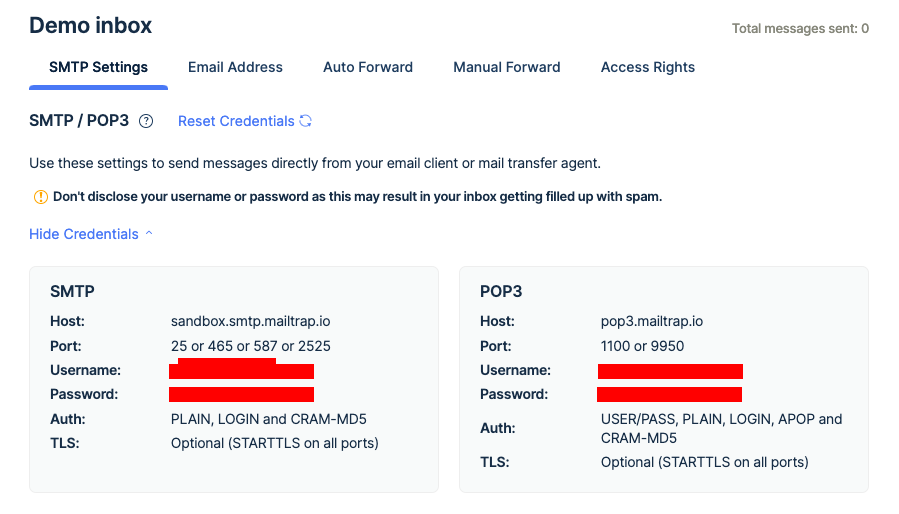
Screenshot 2023 05 31 at 10.16.27 PM

Configuration

  • Open the .env file in the root directory of your Laravel project.
  • Locate the MAIL_MAILER variable and set its value to smtp.
  • Set the following variables with your Mailtrap inbox credentials:
MAIL_MAILER=smtp
MAIL_HOST=sandbox.smtp.mailtrap.io
MAIL_PORT=587
MAIL_USERNAME=your-mailtrap-username
MAIL_PASSWORD=your-mailtrap-password
MAIL_ENCRYPTION=tls
MAIL_FROM_ADDRESS=prashant12it@gmail.com
MAIL_FROM_NAME="${APP_NAME}"

Test Email

  1. Create mailable
php artisan make:mail EmployeeRegistration

app/Mail/EmployeeRegistration.php

<?php

namespace App\Mail;

use Illuminate\Bus\Queueable;
use Illuminate\Contracts\Queue\ShouldQueue;
use Illuminate\Mail\Mailable;
use Illuminate\Queue\SerializesModels;

class EmployeeRegistration extends Mailable
{
    use Queueable, SerializesModels;
    public $details;
    /**
     * Create a new message instance.
     *
     * @return void
     */
    public function __construct($details)
    {
        $this->details = $details;
    }

    /**
     * Build the message.
     *
     * @return $this
     */
    public function build()
    {
        return $this->subject($this->details['subject'])
                    ->view('emails.employee-registration');
    }
}

2. Create email view

resources/views/emails/employee-registration.blade.php

<!DOCTYPE html>
<html>
<head>
    <title>Send email via Mailtrap </title>
</head>
<body>
    <h1>{{ $details['title'] }}</h1>
    <p>{{ $details['body'] }}</p>
   
    <p>Thank you</p>
</body>
</html>

3. Create controller

app/Http/Controllers/EmployeeRegistrationController.php

<?php

namespace App\Http\Controllers;
use Illuminate\Http\Request;
use Illuminate\Support\Facades\Mail;

class EmployeeRegistrationController extends Controller
{
     function sendEmployeeEmail(){
          $details = [
              'email' => 'prashant12it@gmail.com',
              'title' => 'Mail from ItSolutionStuff.com',
              'body' => 'This is for testing email using smtp'
          ];
          return Mail::to($details['email'])->send(new EmployeeRegistration($details));
     }
}

4. Create Route

routes/web.php

<?php

use Illuminate\Support\Facades\Route;

Route::get('send-email', 'EmployeeRegistrationController@sendEmployeeEmail');
php artisan serve

Open http://127.0.0.1:8000/send-email in your browser

Access Mailtrap Inbox

  • Visit the Mailtrap website and select your inbox.
  • You should see the email sent from your Laravel application in the inbox. Click on it to view its contents, including the HTML and text versions of the email.
PNPM vs NPM: Why should we use PNPM over NPM?

What is PNPM?

PNPM is a package manager for Node.js projects that stands for “Performant Node Package Manager“. It works similarly to other package managers like NPM and Yarn, but with some key differences that make it a unique and beneficial tool for managing dependencies in Node.js projects.

One of the main benefits of using PNPM is its efficient use of disk space. Unlike NPM and Yarn, which create separate copies of dependencies in each project, PNPM uses a single shared cache for all projects on a system. This means that each package is only downloaded and stored once, saving disk space and reducing download times.

Benefits of using PNPM over NPM

Faster installation times

PNPM’s use of a shared cache means that dependencies are only downloaded once, reducing installation times for subsequent projects. This can be particularly beneficial for large projects with many dependencies.

Reduced disk space usage

Since PNPM uses a shared cache, each package is downloaded only once and shared across all projects on a system. This can lead to significant disk space savings, particularly if many projects have the same dependencies.

Efficient use of system resources

PNPM’s use of hard links to link packages between projects means that it avoids copying files between directories, reducing the number of file operations required during installation and update processes. This can help to reduce CPU and I/O usage on your system.

Simple migration

PNPM and package.json are compatible. Since PNPM uses the same JSON format as NPM, existing projects can be easily transferred over without requiring any changes to your code.

Improved collaboration

PNPM’s shared cache makes it easier for teams to collaborate on projects without having to manage multiple copies of the same dependencies.


Also Read: Typescript Technical Interview Questions 2023 – Part 1


Understand with an example

Let’s understand with an example how using PNPM is beneficial over NPM. We are going to create 2 projects with NPM and 2 projects with PNPM and see the difference in the file structure of all projects. Let’s get started.

Install PNPM

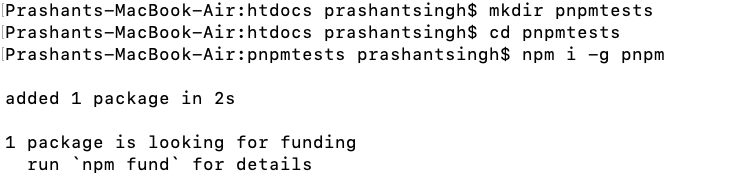
The first step is to install PNPM using NPM.

npm i -g pnpm

I’ve created a directory to keep all projects in one place, you can also follow the same if you’re following this manual.

1
Installing PNPM

Create 1st project using NPM – npmtest1

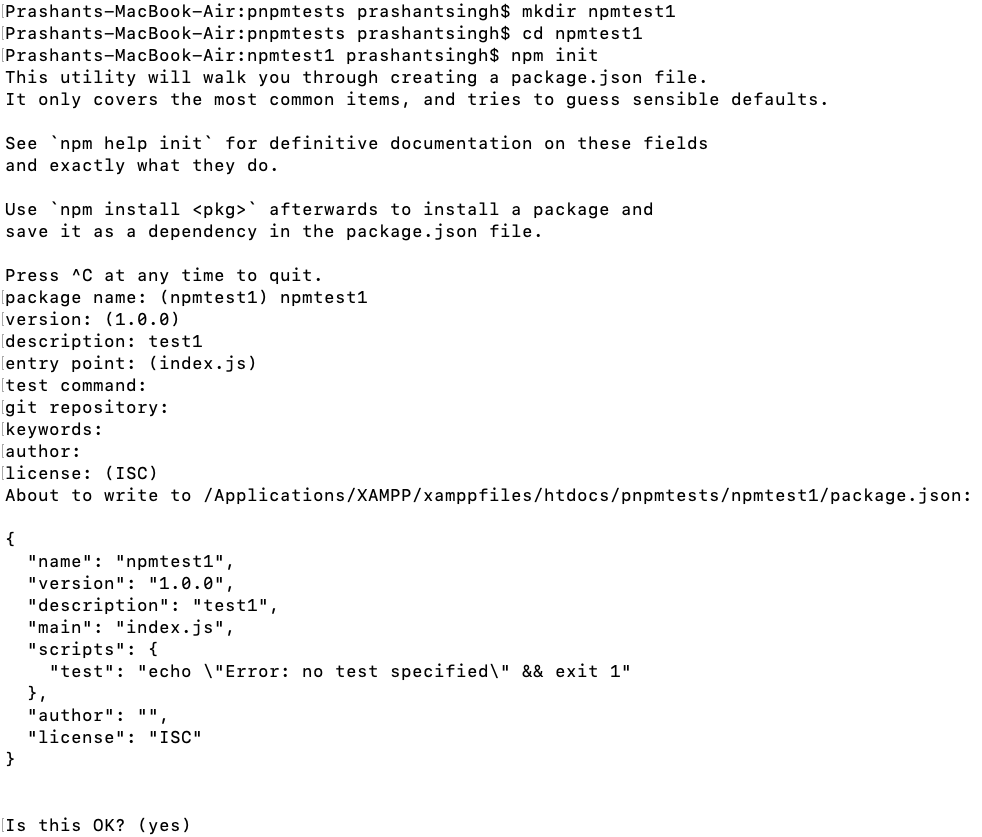
Create a directory for the project and initialize it as a node project.

mkdir npmtest1
cd npmtest1
npm init #This will ask some questions, answer it. If you press enter for each question, then also it will be fine
2

Install node package using NPM

Now install any node package by using npm command. I’m installing `express`.

npm i express
3
Installing express node package

Check the file structure of the project

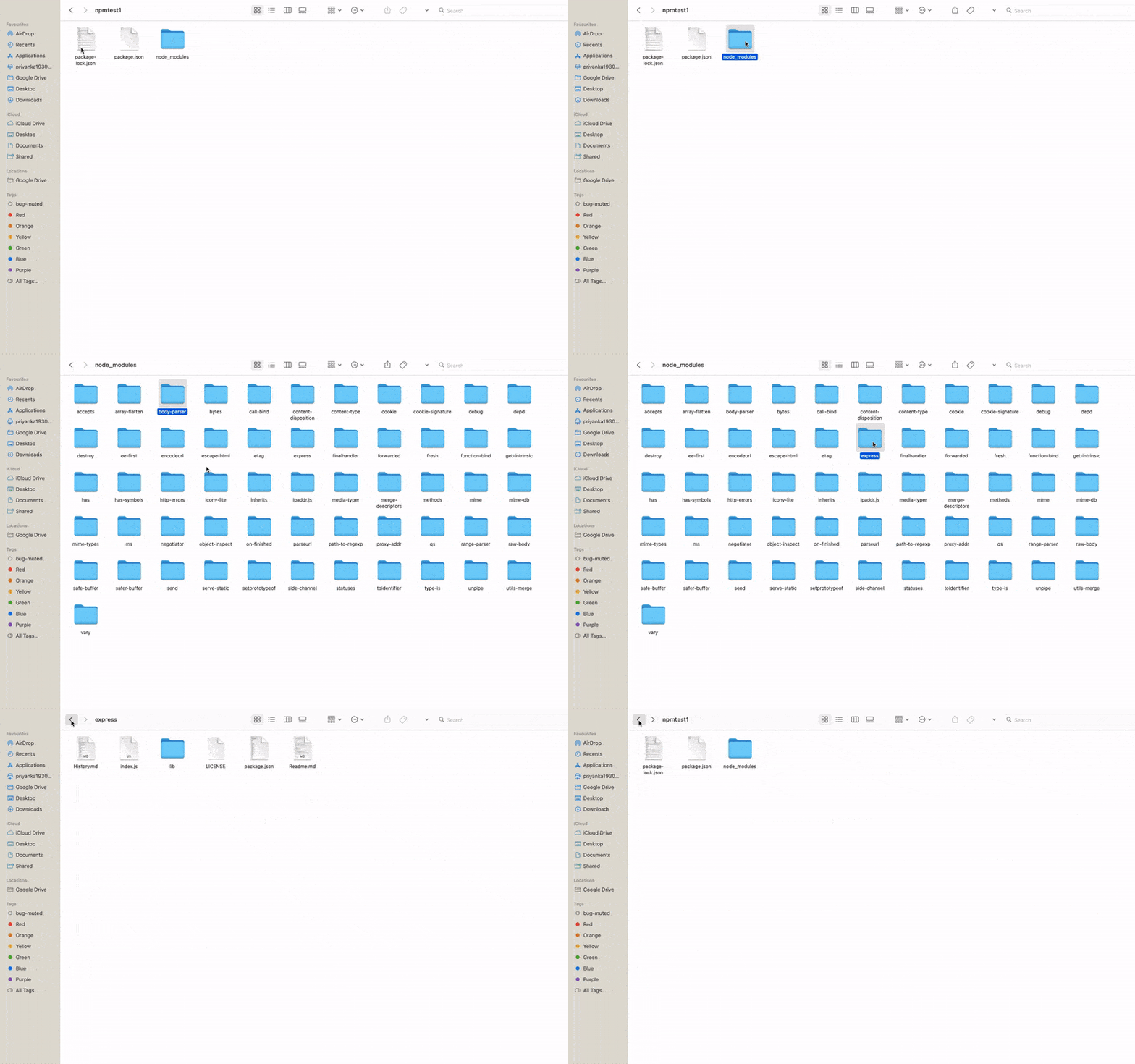
When you check the project folder i.e. npmtest1, you will get 1 package.json file, 1 package-lock.json file, and 1 node_modules directory.

`package.json` file contains project configuration and dependencies.

`package-lock.json` file contains all dependencies of the installed package and their dependencies.

`node_module` directory contains the installed package and their dependencies.

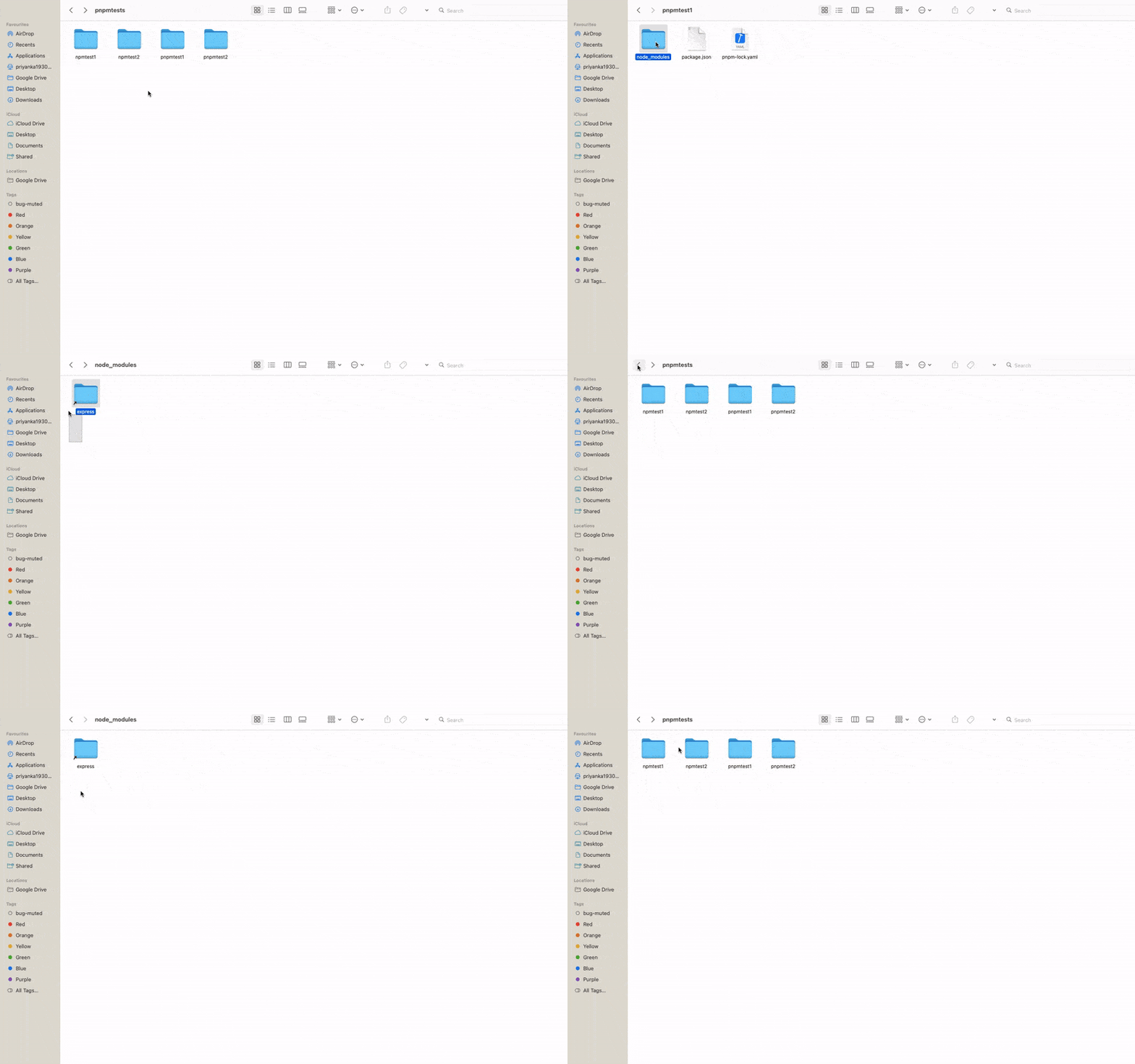
When you open the node_modules directory, you’ll get express package in that directory.

1
File and directory structure of node project

Also Read: Setting Up and Configuring Supervisor for Process Management on AWS EC2 Ubuntu


Create 2nd project using NPM – npmtest2

Now, repeat the above steps to create another project using npm and check its files & directory structure.

mkdir npmtest2
cd npmtest2
npm init
npm install express

You’ll get the same file & directory structure as the npmtest1 project.

2

Create 1st project using PNPM – pnpmtest1

We’re going to create a project using pnpm command. There is no difference in the procedure of creating a node project using pnpm, only you have to replace the npm with pnpm that’s it.

mkdir pnpmtest1
cd pnpmtest1
pnpm init
pnpm install express
9
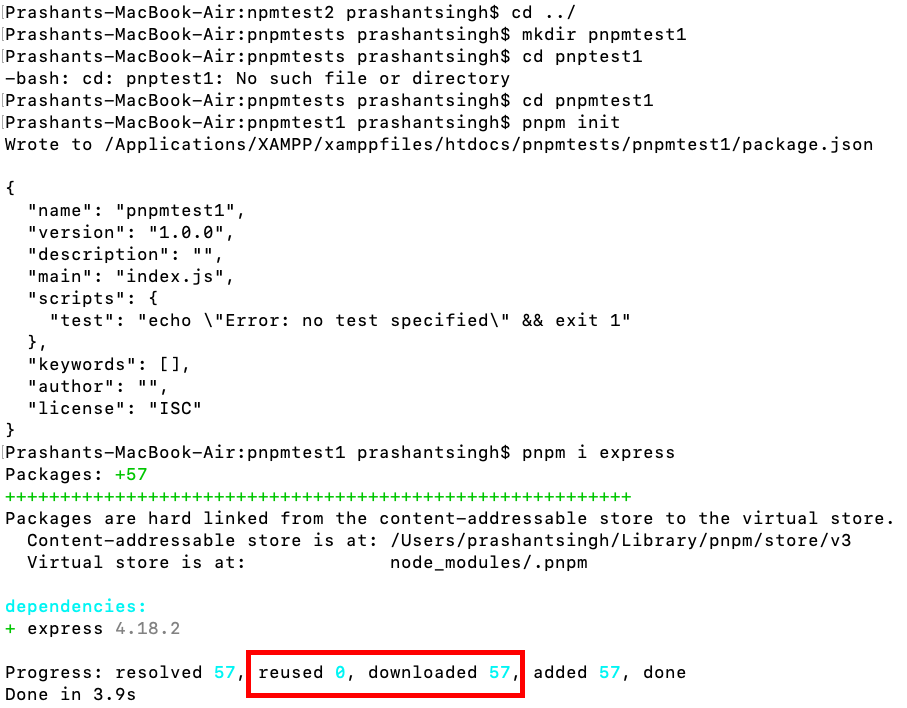
Creating node project using `pnpm`

It shows, how many new packages are downloaded and how many are reused from the already downloaded packages.


Create 2nd project using PNPM – pnpmtest2

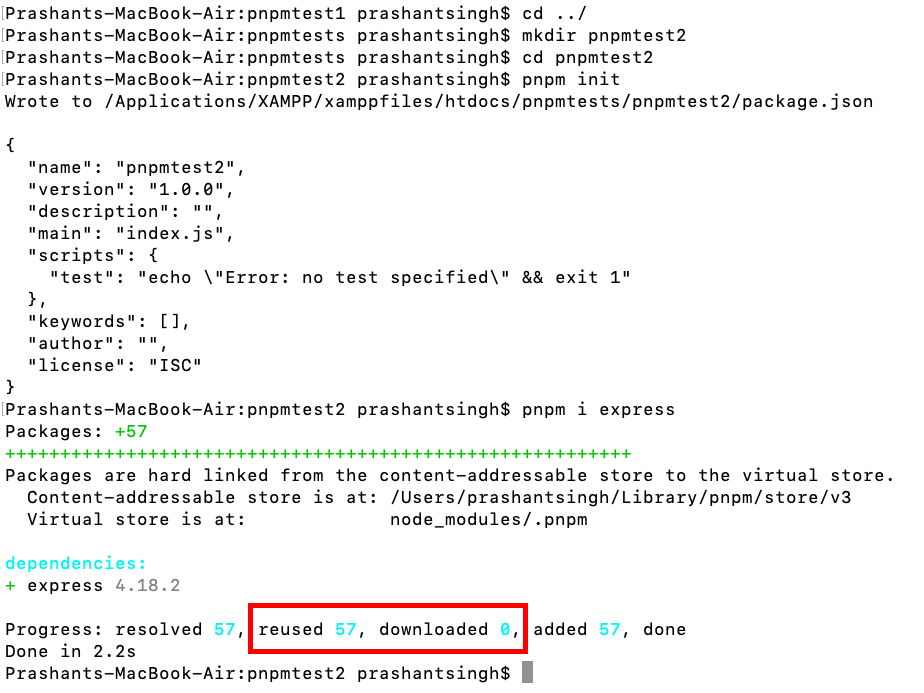
Create 2nd project using the same steps as above and note the last message about the downloaded and reused packages.

mkdir pnpmtest2
cd pnpmtest2
pnpm init
pnpm install express
12

Here it shows 57 reused and 0 downloaded, i.e. means it is taking reference of the package from the cache and not creating copy as it does in the case of npm


Files and Directory structure of PNPM projects

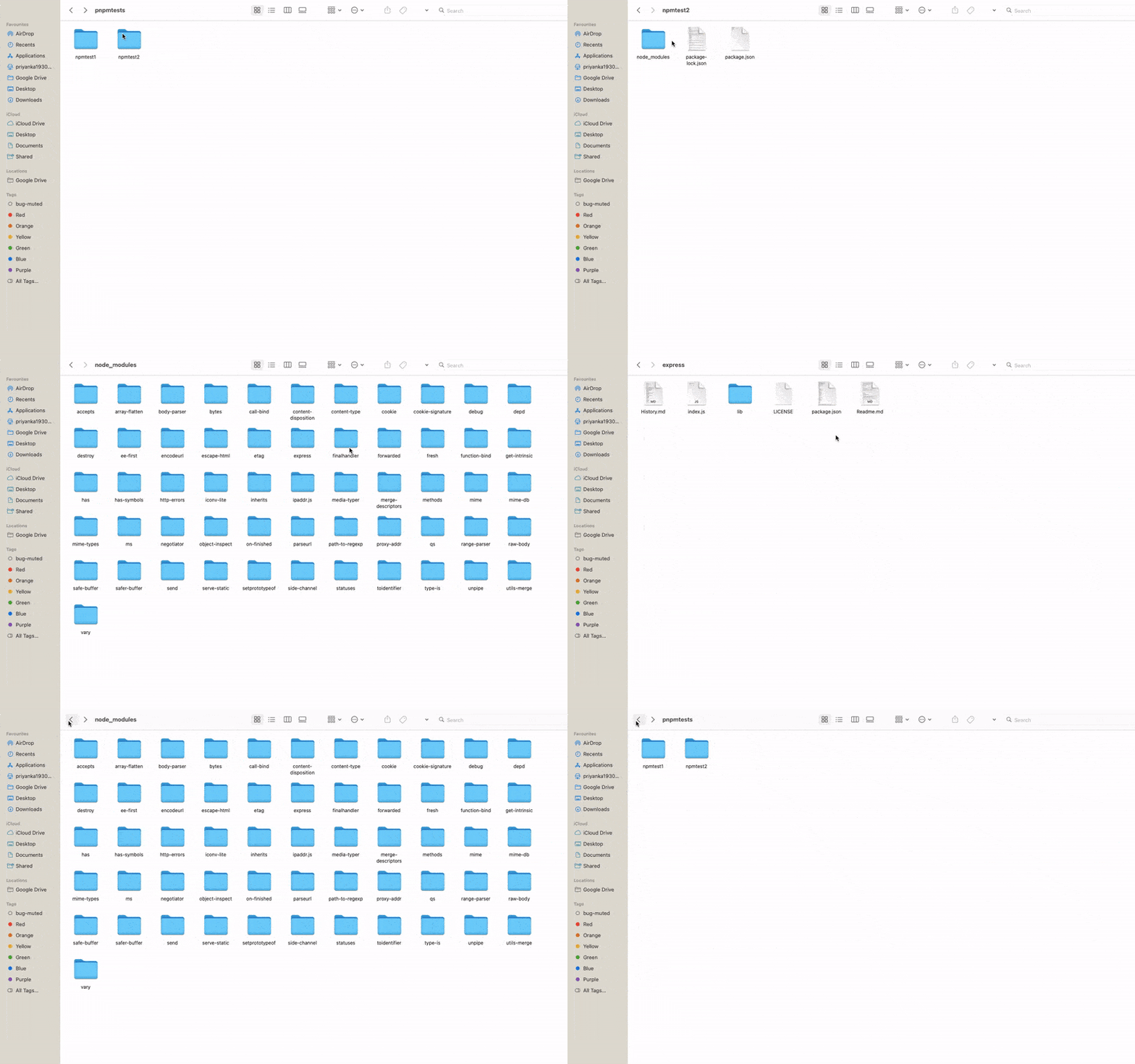
In, the files and directory structure of PNPM projects, you’ll find that there is only 1 directory shortcut(reference) of the installed package and it will not add fresh package & all its dependencies in the project like the NPM one.

3
Files and directory structure of node projects created using PNPM

Also Read: Learn How to Use the Slack API to Post Messages in Slack Channel Using Laravel


Video Tutorial


FAQs

Why is there inefficient package management and resource utilization

Because traditional package managers like NPM and Yarn create separate copies of dependencies for each project.

Why do traditional package managers create separate copies of dependencies?

Because they do not utilize a shared cache system for dependencies

Why do traditional package managers not utilize a shared cache system?

Because they were designed with a focus on isolation and dependency management per project.


Why were traditional package managers designed with a focus on isolation?

Because at the time of their development, the primary concern was ensuring project-specific dependencies did not conflict with each other.

Why was ensuring project-specific dependency isolation the primary concern?

Because early development practices prioritized encapsulation and avoiding dependency conflicts to maintain project stability and reliability.

How does PNPM implement a shared cache system?

PNPM stores dependencies in a single shared cache, ensuring that each package is downloaded and stored only once.

How does PNPM ensure that each package is downloaded and stored only once?

PNPM uses hard links to link packages between projects, avoiding the need for separate copies of dependencies.

How does PNPM utilize hard links to link packages between projects?

PNPM creates directory shortcuts (references) to the installed packages, rather than copying them into each project’s directory.

How do directory shortcuts (references) optimize resource utilization?

Directory shortcuts allow multiple projects to share the same dependencies, reducing disk space usage and improving installation times.


Closing note – Summary

Overall, PNPM offers several advantages over NPM, making it an excellent choice for developers looking to optimize their workflows and streamline their package management processes. However, NPM remains a popular choice for many developers, particularly those who are already familiar with its interface and features.

Laravel 11 Slack API to Send Notifications in Slack Channel

Slack is a famous team communication tool that allows users to send messages, share files, and collaborate on projects. Laravel is a robust PHP web framework that makes it easy to build web applications. This tutorial will explore how to send messages and notifications on Slack using the Slack API in Laravel 11 – The most popular Php framework.

Create a Slack App

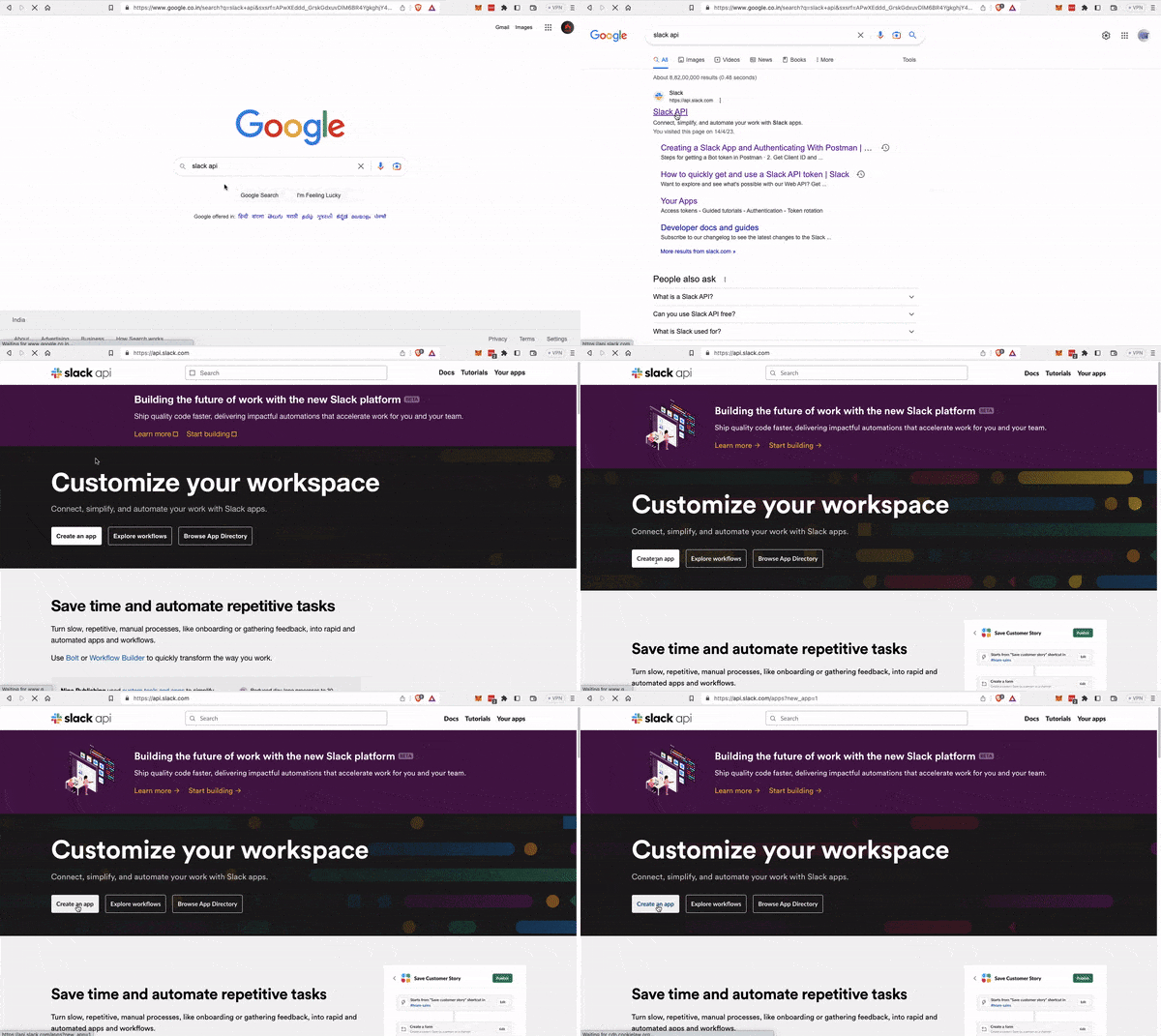
The first step is to create a Slack app. You can create a new app on the Slack API website.

Slack API website

create slack app

Create slack APP

create slack app

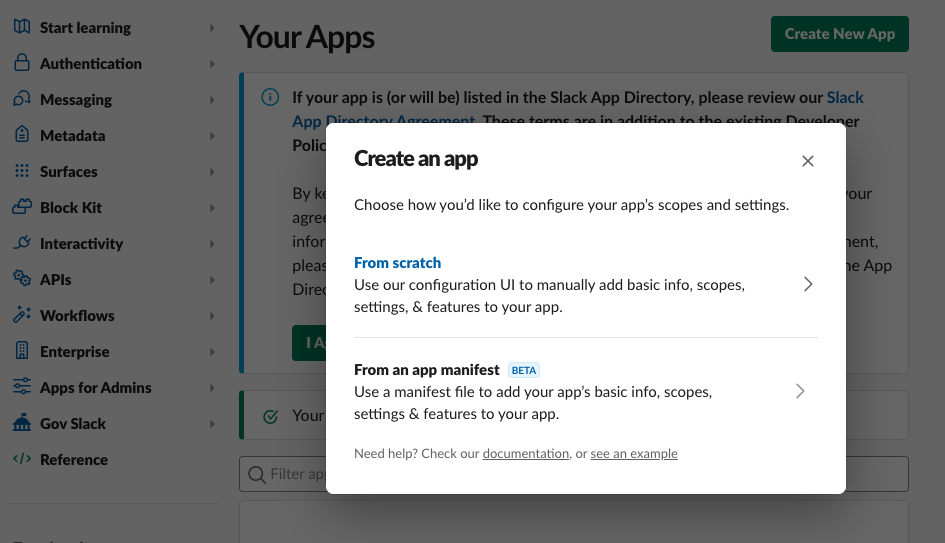
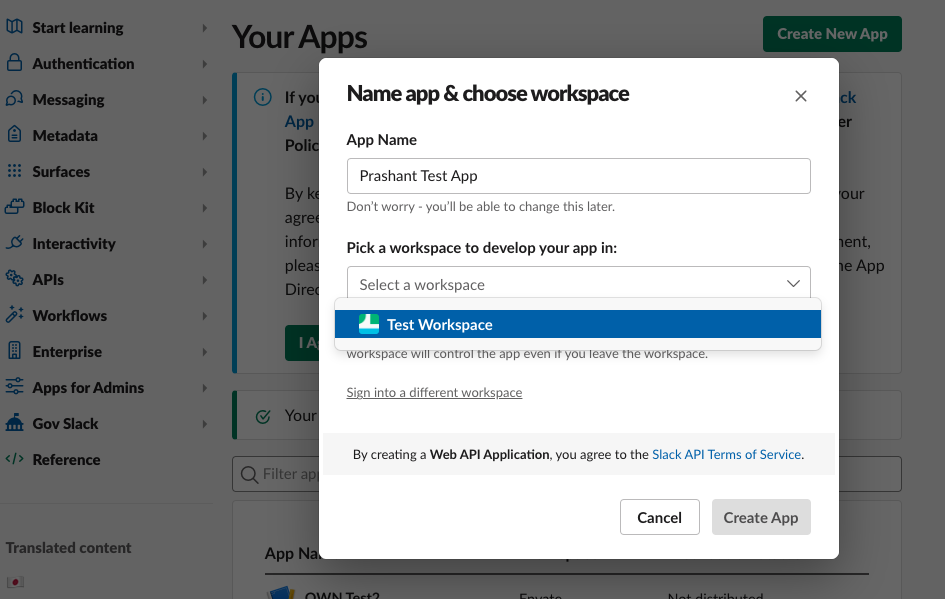
Slack app creation from scratch

Slack app creation

Also Read: Graph API In Laravel: Read, filter, save emails in PDF


Define Scope/permissions

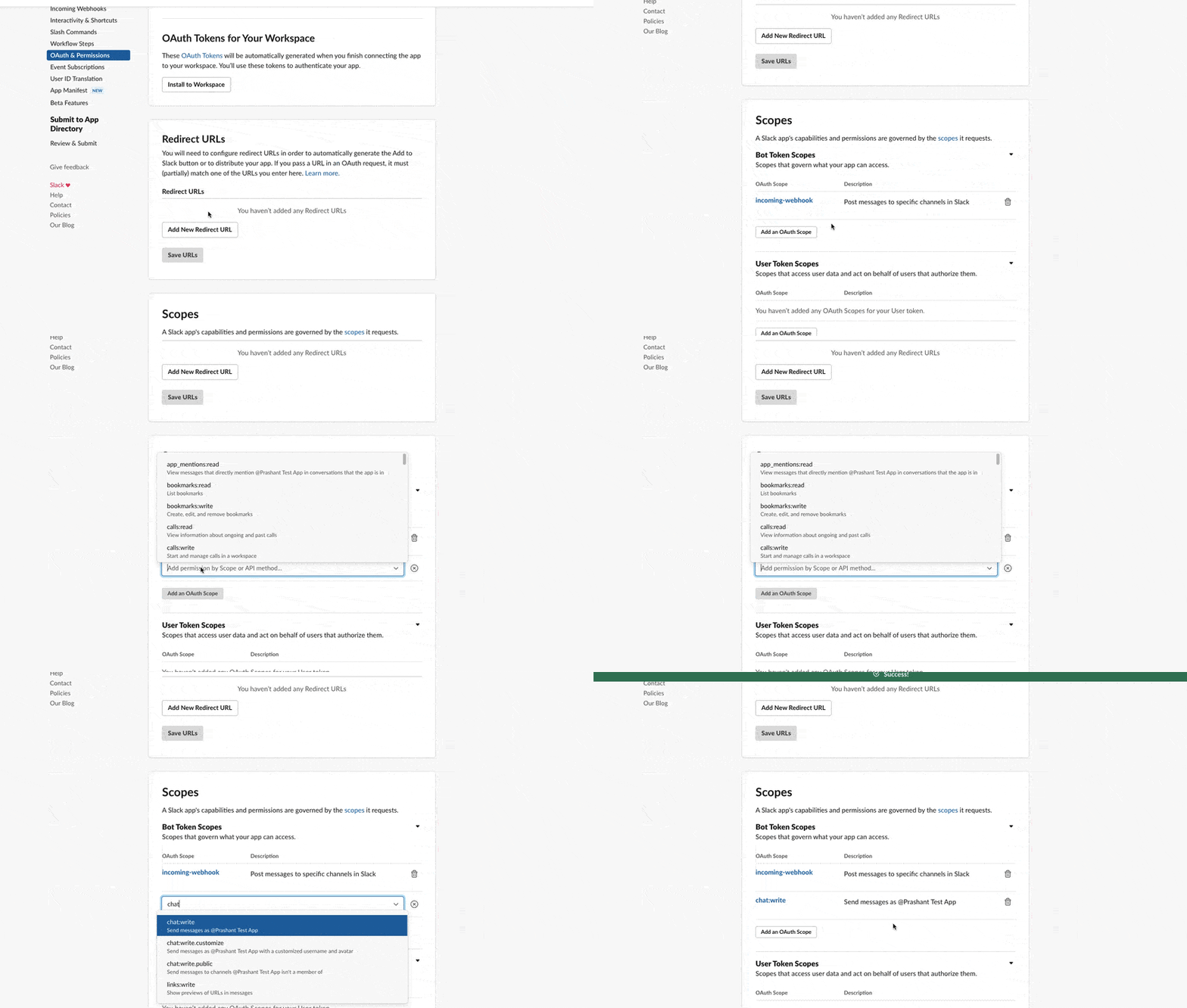
Once you have created a new app, go to the “OAuth & Permissions” section and add the chat:write scope to your bot token.

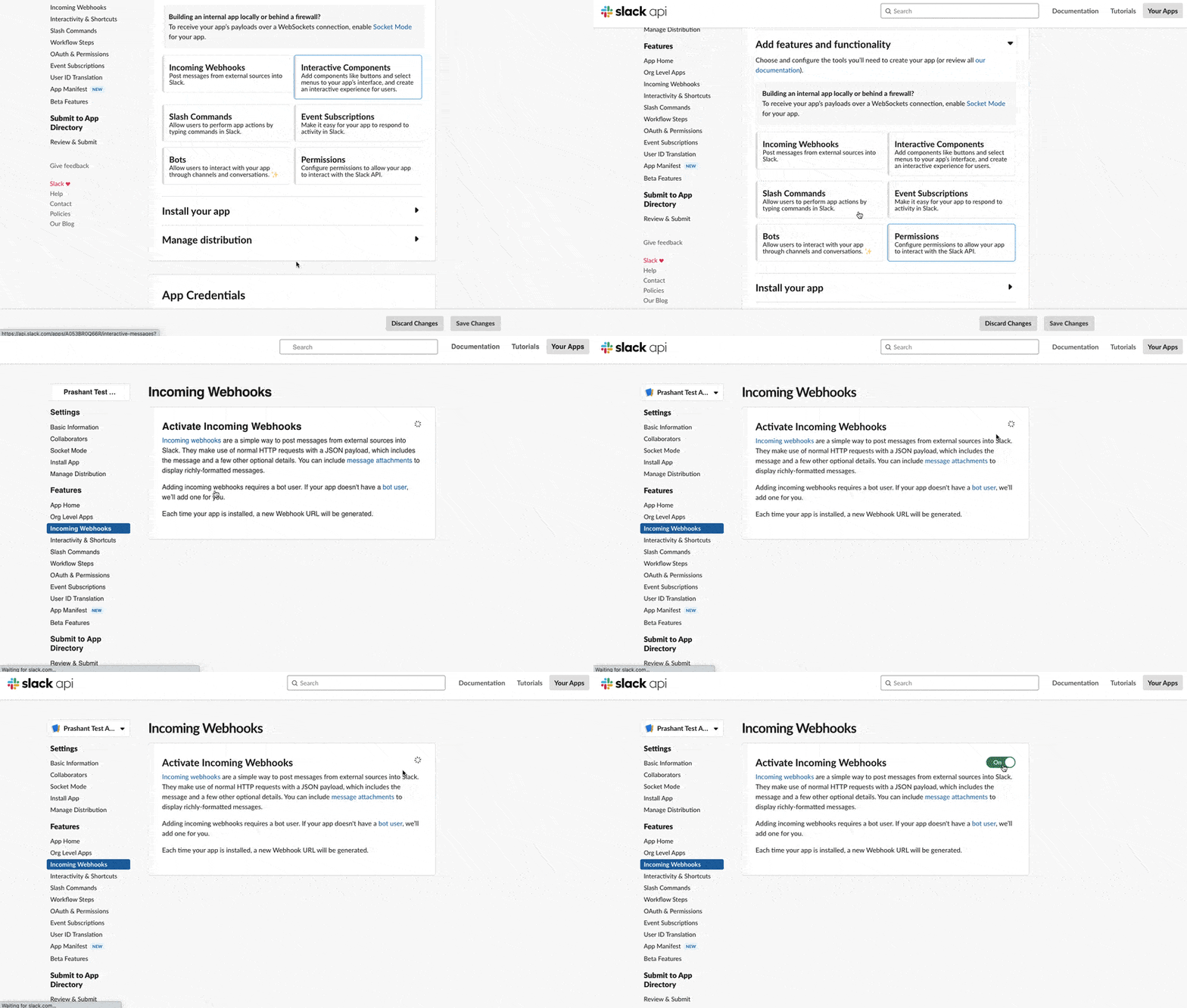
Activate Slack app incoming webhooks

s0

Add chat:write permission to the app

s2

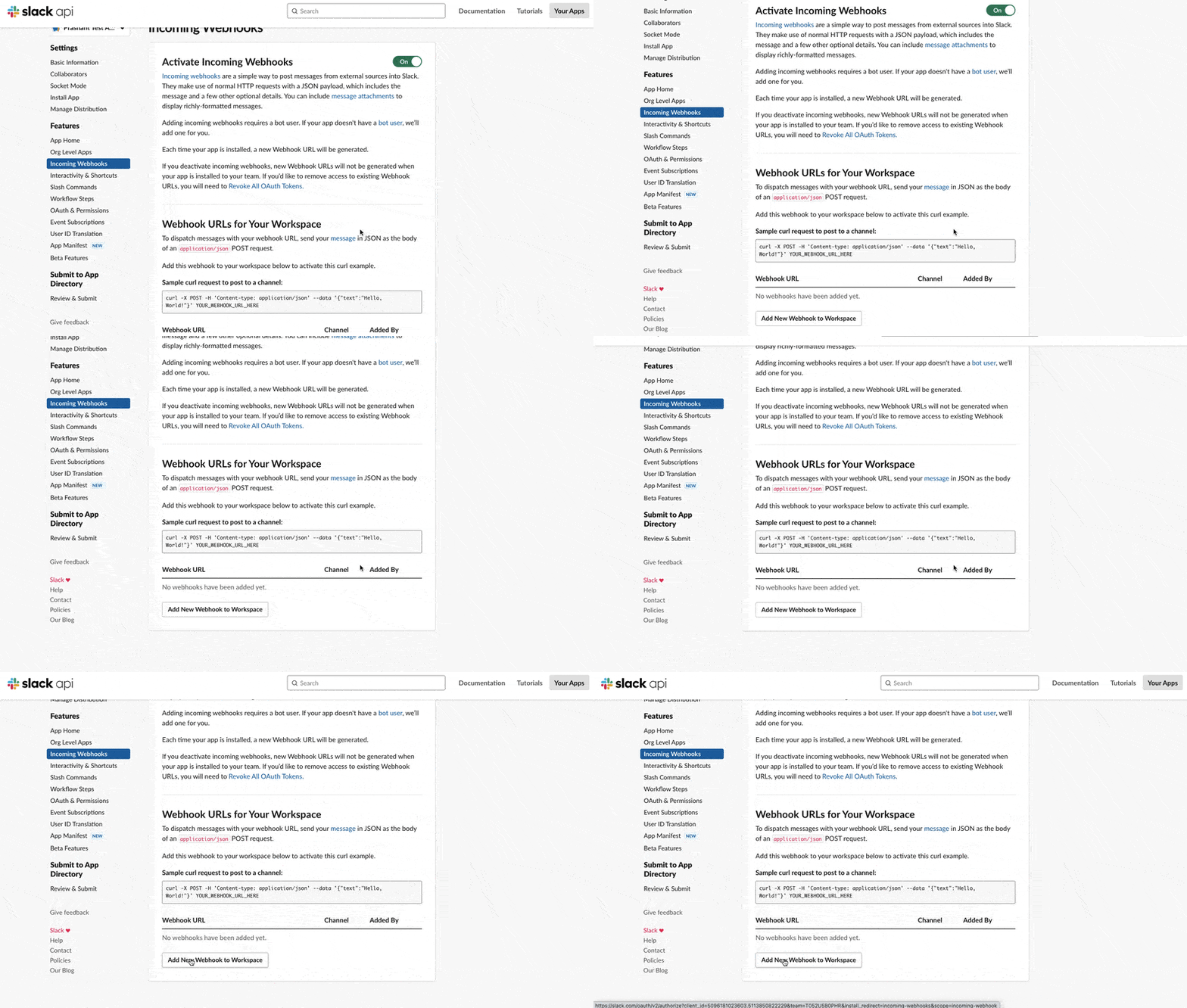
Add webhook to workspace

s3

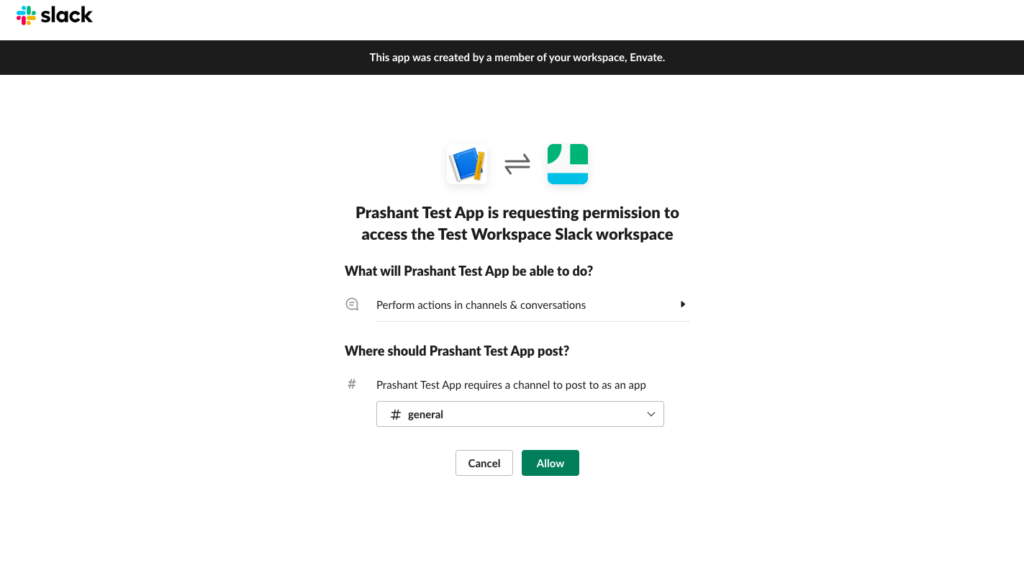
Install the app to the workspace

p5

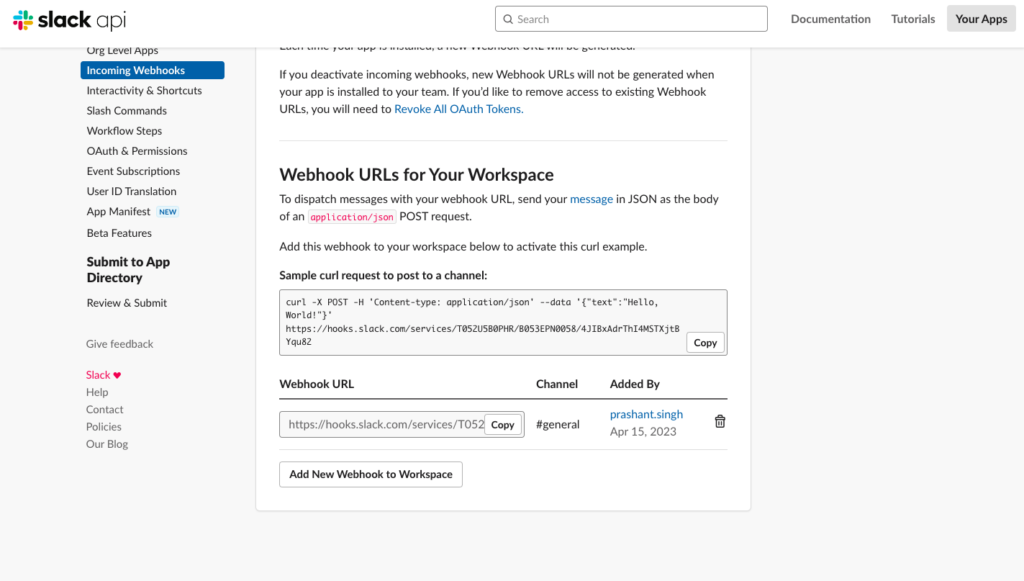
Webhook URL for the Slack channel

Screenshot 2023 04 16 at 1.24.02 PM

Also Read: Setting Up and Configuring Supervisor for Process Management on AWS EC2 Ubuntu


Install the Slack Package

To use the Slack API in Laravel, we need to install the laravel/slack-notification-channel package using Composer. Open your terminal and run the following command:

composer require laravel/slack-notification-channel


Set webhook URL in .env (Environment)

This URL can be found in the “Incoming Webhooks” section of your Slack app settings. Set this URL in environment file of the application for configuration setting.

SLACK_WEBHOOK_URL="https://hooks.slack.com/services/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Hqa"

Also Read: What is N+1 Query Problem? How do you solve it in Laravel?


Create a Notification Class

We will use Laravel’s notification system to send messages to Slack. To create a new notification class, run the following Artisan command:

php artisan make:notification SlackNotification

This will create a new SlackNotification.php file in the app/Notifications directory.

Define the via method

Open the file and define the via method to return an array with the “slack” channel. This tells Laravel to send the message using the Slack channel.

/**
     * Get the notification's delivery channels.
     *
     * @param  mixed  $notifiable
     * @return array
     */
public function via($notifiable)
    {
        return ['slack'];
    }

Add a toSlack method

Next, add a “toSlack” method that returns a new SlackMessage instance with the message to be sent to Slack.

public function toSlack($notifiable)
    {
        return (new SlackMessage)
            ->content('Hi! everyone this is welcome message');
    }

Make sure to include SlackMessage class in the file

use Illuminate\Notifications\Messages\SlackMessage;

You can customize the message by passing different parameters to the SlackMessage constructor or by adding additional methods to the SlackMessage instance.


Also Read: Create Short URL Hashing & Tracking Project in 10 Minutes


Send a Message to Slack

To send messages on the Slack channel, We create a controller and define a method that we call using a route. In the method body, we call notification that we have created in the above step.

php artisan make:contoller Api/ApiController

This will create an ApiController.php file in side app/http/controller/Api folder. In this file we define our method to call the notification.

namespace App\Http\Controllers\Api;

use App\Http\Controllers\Controller;
use App\Notifications\SlackNotification;
use Illuminate\Support\Facades\Notification;

class ApiController extends Controller
{
    function slackNotificationMessage(){
        Notification::route('slack',env('SLACK_WEBHOOK_URL'))->notify(new SlackNotification());
        return response()->json(['message'=>'Notification sent'], 200);
    }
}

Define a route to execute this method. Open routes/api.php and write the following code.

use Illuminate\Http\Request;
use Illuminate\Support\Facades\Route;

/*
|--------------------------------------------------------------------------
| API Routes
|--------------------------------------------------------------------------
|
| Here is where you can register API routes for your application. These
| routes are loaded by the RouteServiceProvider within a group which
| is assigned the "api" middleware group. Enjoy building your API!
|
*/

 Route::get('/slack-message', 'Api\ApiController@slackNotificationMessage');

Also Read: How To Validate Location From IP & Zipcode Using Laravel 10?


Output

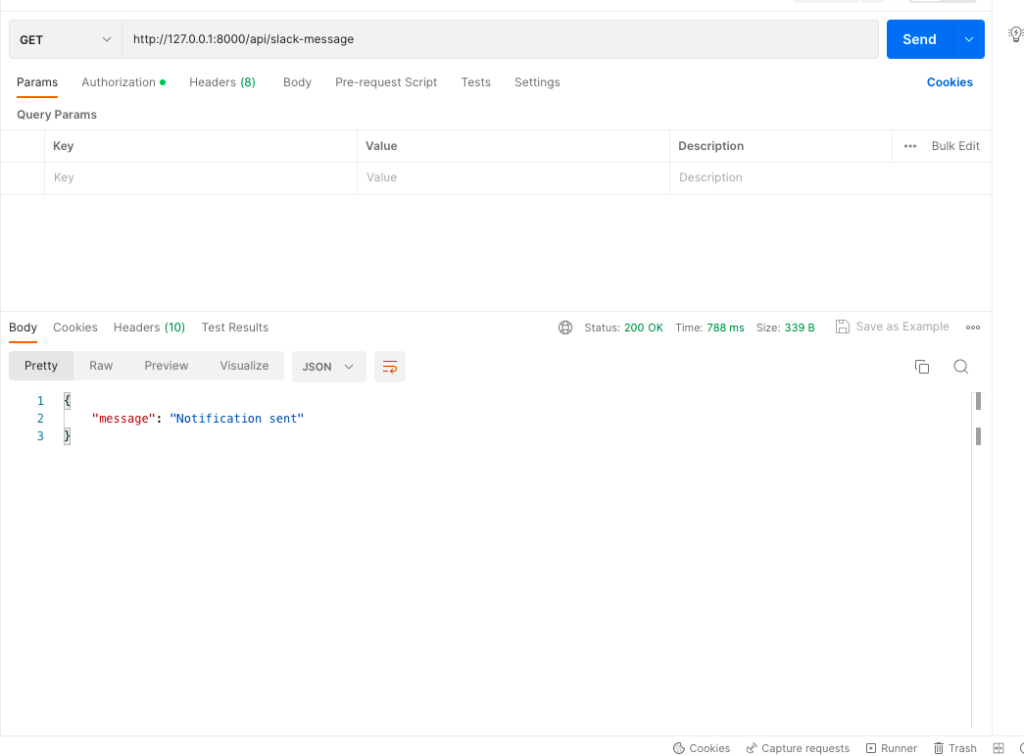
Calling the API to send the message on Slack channel

Screenshot 2023 04 16 at 2.22.25 PM

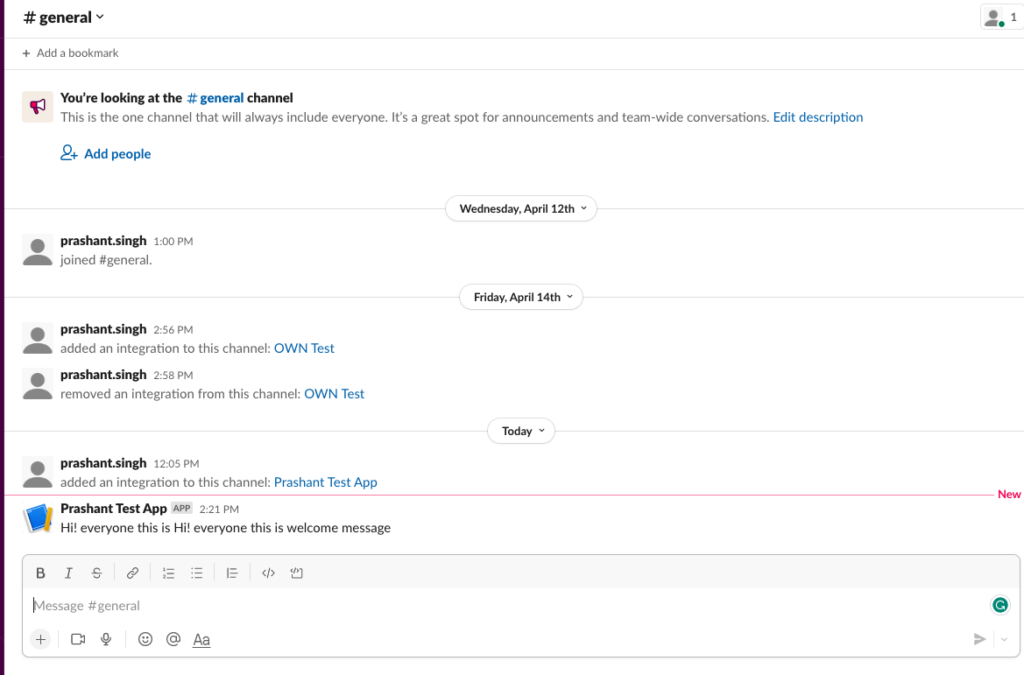
Message received on Slack

Screenshot 2023 04 16 at 2.22.11 PM


FAQs

Why do users want to send notifications on a Slack channel?

Users want to streamline communication and collaboration on projects.
Efficient collaboration is crucial in project management. The use of Slack, a centralized platform for real-time communication and file sharing, offers a unified space where teams can interact seamlessly. This consolidation eliminates the need for scattered communication channels, providing a focused environment for project-related discussions and updates.

Why do users need to streamline communication and collaboration?

Efficient communication enhances productivity and ensures timely project updates.
Timely updates and clear communication are vital for project success. In a collaborative environment, quick information exchange enables team members to stay informed about project developments. This, in turn, facilitates prompt decision-making, allowing teams to adapt to changes effectively and maintain productivity levels.

Why is efficient communication essential for productivity and project updates?

Timely information exchange helps in quick decision-making, reduces delays, and promotes a synchronized workflow among team members.
A synchronized workflow is critical for maintaining project timelines. Efficient communication not only reduces the risk of misunderstandings but also promotes a cohesive team environment. Team members working in sync can make decisions promptly, minimizing delays and ensuring that the project progresses according to the established timelines.

Why is synchronized workflow crucial for decision-making and project timelines?

Lack of synchronization can lead to miscommunication, errors, and project delays, impacting overall project success and team efficiency.
A lack of synchronization introduces the risk of team members working with outdated or conflicting information. Miscommunication in such scenarios can result in errors during project execution, leading to delays. These delays can have a cascading effect on the overall success of the project and the efficiency of the team.

Why does miscommunication lead to errors and project delays?

Miscommunication can result from disparate communication tools, causing confusion and misunderstandings among team members, ultimately affecting project timelines and success.

Conclusion

You should now be able to send messages to your Slack channel using the Slack API in Laravel.