

How To Setup Real-Time Synchronization with Laravel 11 Pusher & Angular 18?


How To Setup WebSocket Communication Among Different Screens with Laravel 11 Pusher & Angular 18?


In this tutorial, we’ll walk through the steps to set up real-time synchronization using Laravel 11 Pusher on an AWS EC2 instance. We’ll deploy a Laravel backend, configure Pusher for broadcasting events, and connect it to an Angular frontend. This setup ensures that any action taken on one screen is immediately reflected on other connected screens.


Example: Real-Time Task Tracker Application with Laravel 11, Pusher and Angular 18


Let us take an example of Real-Time Task Tracker Application to understand Real-Time Synchronization process. In this example, we will create a real-time task tracker application using Laravel 11 for the backend, Angular 18 for the frontend, and Pusher for WebSocket communication. The task tracker will allow users to create, update, and track tasks in real-time, synchronizing the task list across multiple browsers and devices.


Prerequisites


Before we start, make sure you have the following installed:

  • PHP
  • Composer
  • Node.js and npm
  • Angular CLI
  • An AWS EC2 instance with Ubuntu and Apache (or another server setup)
  • Pusher account


Step 1: Setup Pusher Account


Create Account

You need to create a Pusher account in order to access their socket communication functionality.

Create a Channel Application

Create a channel application with any name of your choice, server cluster, frontend, and backend tech stack.
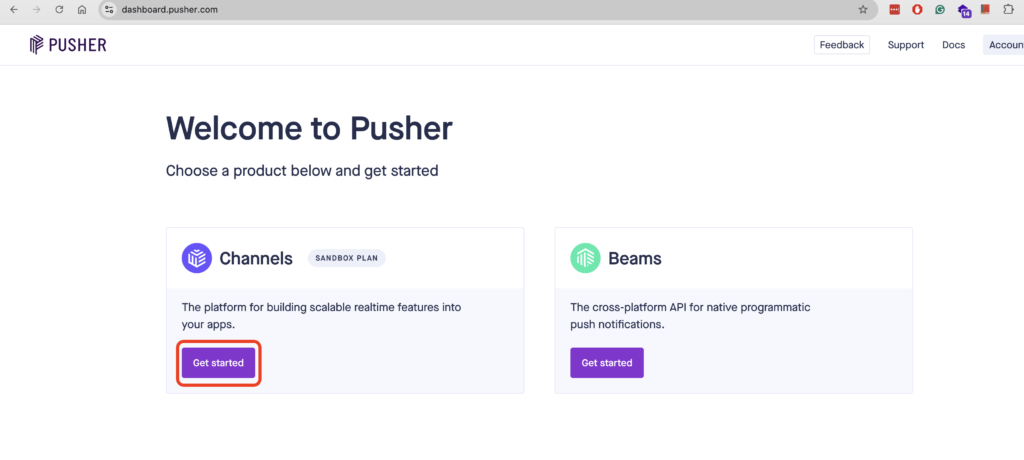
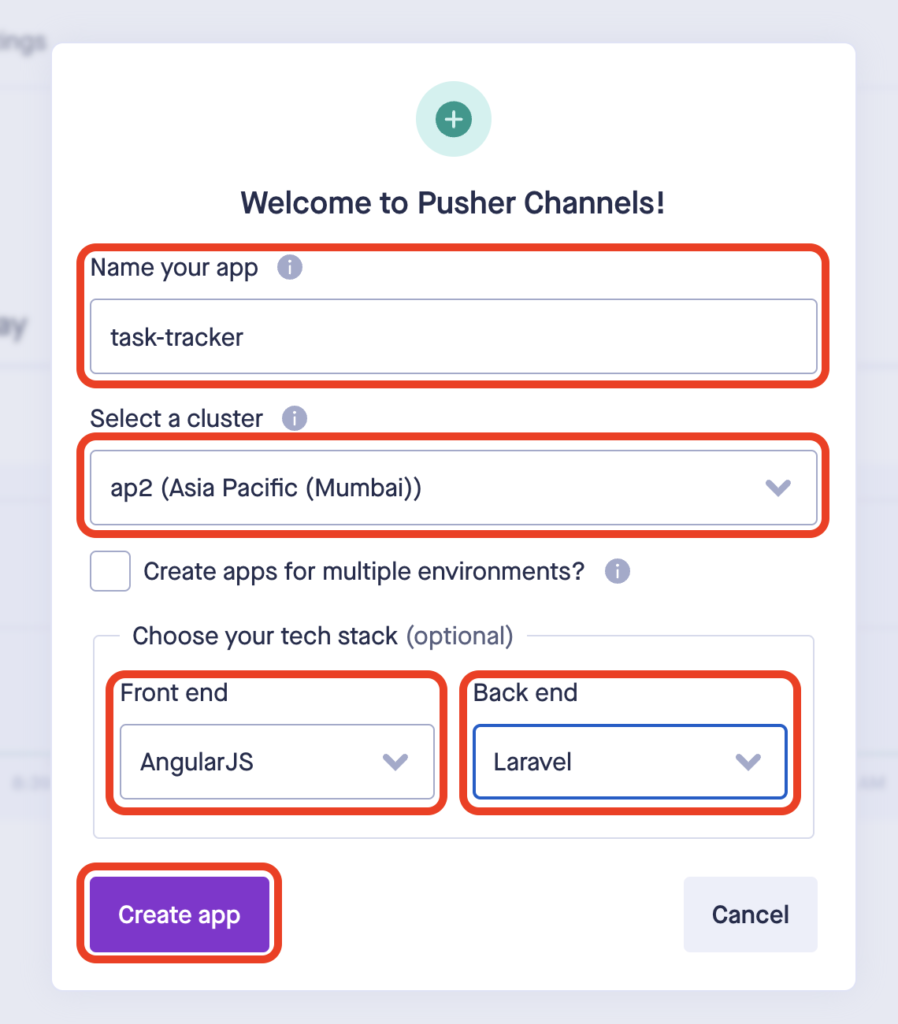
pusher create channel
Pusher Create Channel
pusher channel configuration
Pusher Channel Configuration

Frontend and Backend Configurations

Once you create app, you will be redirected to getting started page. On this page select your frontend and backend tech stack to get sample code with configuration variables. Note down all the configuration variables(highlighted in the images of sub-sections)

Frontend

As we’re using Angular 18 with Laravel as backend, we need to install laravel-echo and pusher-js via npm.

npm install --save laravel-echo pusher-js
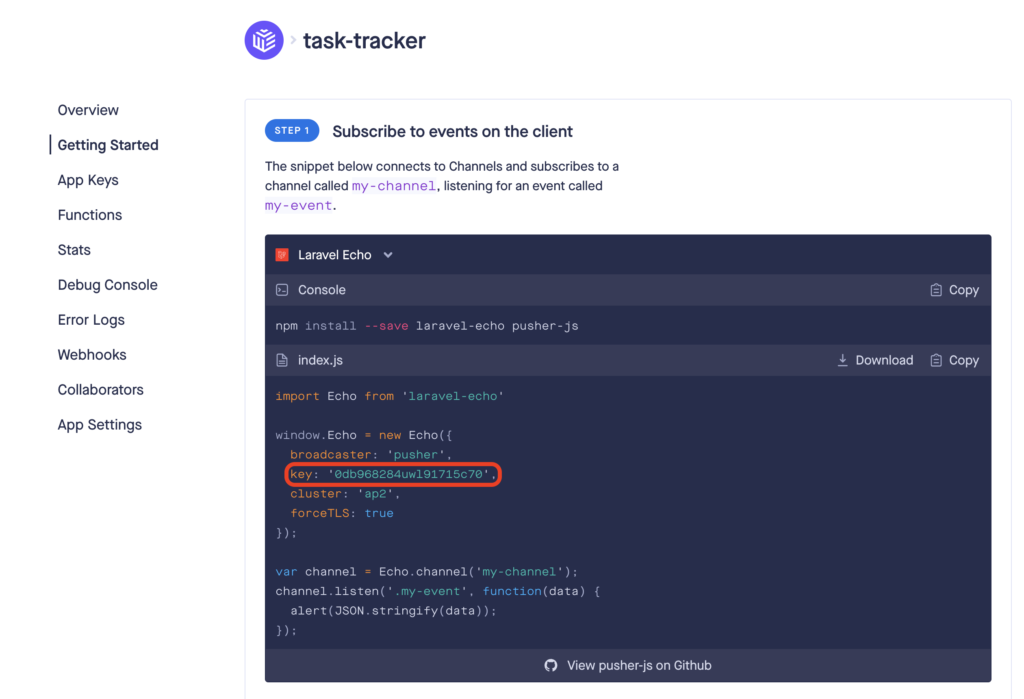
laravel echo pusher configuration

Backend

In laravel we’ve to install pusher-php-server package via composer and save the configuration variables in .env file(explained in further sections)

composer require pusher/pusher-php-server
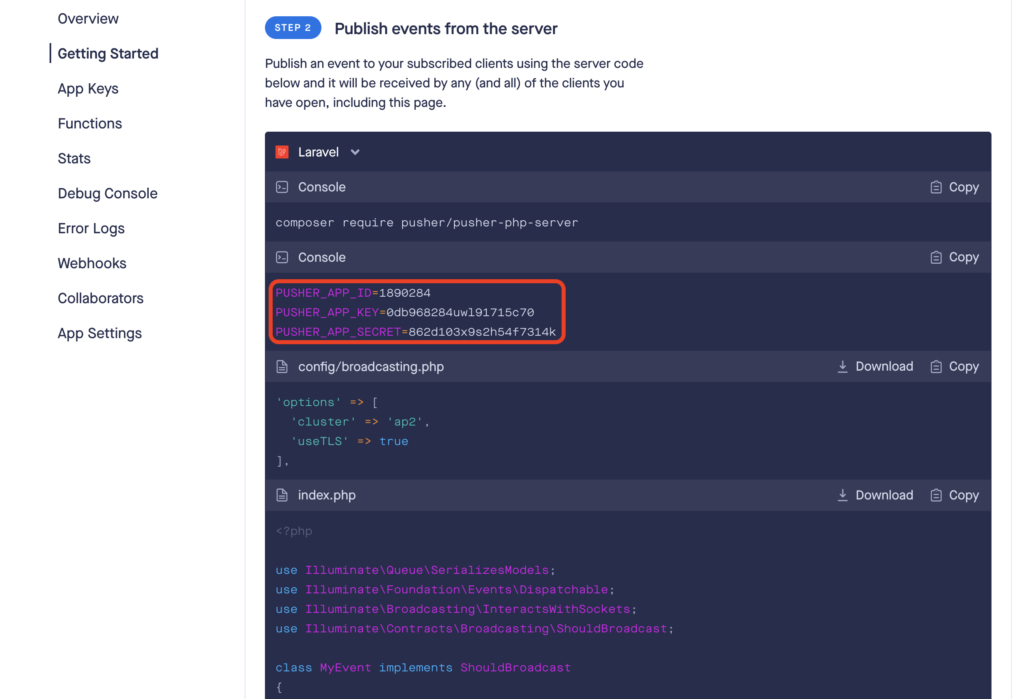
backend pusher configuration laravel
Backend Pusher Configuration Laravel

Step 2: Setting Up the Backend with Laravel


Install Laravel

composer create-project --prefer-dist laravel/laravel task-tracker
cd task-tracker

Configure Environment Variables

Edit your .env file to include your database and Pusher credentials(Highlighted in Backend section of Step1: Setup Pusher Account )

BROADCAST_DRIVER=pusher

PUSHER_APP_ID=your-pusher-app-id
PUSHER_APP_KEY=your-pusher-app-key
PUSHER_APP_SECRET=your-pusher-app-secret
PUSHER_APP_CLUSTER=mt1

DB_CONNECTION=mysql
DB_HOST=127.0.0.1
DB_PORT=3306
DB_DATABASE=task_tracker
DB_USERNAME=root
DB_PASSWORD=

Create Task Model and Migration

php artisan make:model Task -m

Define Task Table Schema

Update the create_tasks_table migration file

public function up()
{
    Schema::create('tasks', function (Blueprint $table) {
        $table->id();
        $table->string('title');
        $table->boolean('completed')->default(false);
        $table->timestamps();
    });
}

Run Migrations

Create a new MySQL database called task_tracker and run the migrations to create tasks table in the database.

php artisan migrate

Create Task Controller With Resource

php artisan make:controller TaskController --resource

Define Task Routes

Add routes to routes/api.php

use App\Http\Controllers\TaskController;

Route::resource('tasks', TaskController::class);

Implement TaskController Methods

namespace App\Http\Controllers;

use App\Events\TaskUpdated;
use App\Models\Task;
use Illuminate\Http\Request;

class TaskController extends Controller
{
    public function index()
    {
        return Task::all();
    }

    public function store(Request $request)
    {
        $task = Task::create($request->all());
        event(new TaskUpdated('create', $task));
        return $task;
    }

    public function update(Request $request, Task $task)
    {
        $task->update($request->all());
        event(new TaskUpdated('update', $task));
        return $task;
    }

    public function destroy(Task $task)
    {
        $task->delete();
        event(new TaskUpdated('delete', $task));
        return response()->json(null, 204);
    }
}

Create TaskUpdated Event

Create a TaskUpdate event to broadcast the data to all connected devices

php artisan make:event TaskUpdated
namespace App\Events;

use App\Models\Task;
use Illuminate\Broadcasting\Channel;
use Illuminate\Broadcasting\InteractsWithSockets;
use Illuminate\Broadcasting\ShouldBroadcast;
use Illuminate\Foundation\Events\Dispatchable;
use Illuminate\Queue\SerializesModels;

class TaskUpdated implements ShouldBroadcast
{
    use Dispatchable, InteractsWithSockets, SerializesModels;

    public $action;
    public $task;

    public function __construct($action, Task $task)
    {
        $this->action = $action;
        $this->task = $task;
    }

    public function broadcastOn()
    {
        return new Channel('tasks');
    }
}


Step 3: Deploy Laravel on AWS EC2 – (Optional)


SSH into your EC2 instance

ssh -i /path/to/your-key.pem ubuntu@your-ec2-public-ip

Install Necessary Software

sudo apt update
sudo apt upgrade -y
sudo apt install -y apache2 libapache2-mod-php php php-cli php-mbstring php-xml php-bcmath php-curl unzip

Install Composer

cd ~
curl -sS https://getcomposer.org/installer -o composer-setup.php
sudo php composer-setup.php --install-dir=/usr/local/bin --filename=composer

Clone your Laravel Project

cd /var/www/html
sudo git clone https://github.com/yourusername/task-tracker.git
cd task-tracker
sudo composer install
sudo cp .env.example .env
sudo php artisan key:generate

Update .env as described in Step 2.2

Set File Permissions

sudo chown -R www-data:www-data /var/www/html/task-tracker
sudo chmod -R 775 /var/www/html/task-tracker/storage
sudo chmod -R 775 /var/www/html/task-tracker/bootstrap/cache

Configure Apache

sudo nano /etc/apache2/sites-available/task-tracker.conf

Add the following content

<VirtualHost *:80>
    ServerAdmin webmaster@www.prashantwebdeveloper.in
    DocumentRoot /var/www/html/task-tracker/public
    ServerName api.xyz.com

    <Directory /var/www/html/task-tracker>
        Options Indexes FollowSymLinks
        AllowOverride All
        Require all granted
    </Directory>

    <Directory /var/www/html/task-tracker/public>
        Options Indexes FollowSymLinks
        AllowOverride All
        Require all granted
    </Directory>

    ErrorLog ${APACHE_LOG_DIR}/error.log
    CustomLog ${APACHE_LOG_DIR}/access.log combined
</VirtualHost>

Enable the new site and the Apache rewrite module

sudo a2ensite task-tracker.conf
sudo a2enmod rewrite
sudo systemctl restart apache2


Step 4: Setting Up the Frontend with Angular


Create an Angular Project

ng new task-tracker-frontend
cd task-tracker-frontend

Install Laravel Echo and Pusher

npm install --save laravel-echo pusher-js

Create Echo Service

Create a new service to initialize Echo in your Angular project

import { Injectable } from '@angular/core';
import Echo from 'laravel-echo';
import Pusher from 'pusher-js';

@Injectable({
  providedIn: 'root'
})
export class EchoService {
  public echo: Echo;

  constructor() {
    (window as any).Pusher = Pusher;

    this.echo = new Echo({
      broadcaster: 'pusher',
      key: 'your-pusher-app-key',
      cluster: 'mt1',
      forceTLS: true,
    });
  }
}

Create Task Service

Create a service to handle task-related actions

import { Injectable } from '@angular/core';
import { HttpClient } from '@angular/common/http';
import { Observable } from 'rxjs';
import { EchoService } from './echo.service';

@Injectable({
  providedIn: 'root'
})
export class TaskService {
  constructor(private http: HttpClient, private echoService: EchoService) {}

  getTasks(): Observable<any> {
    return this.http.get('http://api.xyz.com/api/tasks');
  }

  createTask(task: any): Observable<any> {
    return this.http.post('http://api.xyz.com/api/tasks', task);
  }

  updateTask(task: any): Observable<any> {
    return this.http.put(`http://api.xyz.com/api/tasks/${task.id}`, task);
  }

  deleteTask(taskId: number): Observable<any> {
    return this.http.delete(`http://api.xyz.com/api/tasks/${taskId}`);
  }

  listenForTaskUpdates(callback: (data: any) => void) {
    this.echoService.echo.channel('tasks').listen('TaskUpdated', callback);
  }
}

Create Task Component

import { Component, OnInit } from '@angular/core';
import { TaskService } from './task.service';

@Component({
  selector: 'app-task',
  templateUrl: './task.component.html',
  styleUrls: ['./task.component.css']
})
export class TaskComponent implements OnInit {
  tasks: any[] = [];
  newTask: any = { title: '', completed: false };

  constructor(private taskService: TaskService) {}

  ngOnInit(): void {
    this.loadTasks();

    this.taskService.listenForTaskUpdates((data: any) => {
      this.handleTaskUpdate(data);
    });
  }

  loadTasks() {
    this.taskService.getTasks().subscribe(tasks => {
      this.tasks = tasks;
    });
  }

  addTask() {
    this.taskService.createTask(this.newTask).subscribe(task => {
      this.tasks.push(task);
      this.newTask = { title: '', completed: false };
    });
  }

  updateTask(task: any) {
    this.taskService.updateTask(task).subscribe();
  }

  deleteTask(taskId: number) {
    this.taskService.deleteTask(taskId).subscribe(() => {
      this.tasks = this.tasks.filter(task => task.id !== taskId);
    });
  }

  handleTaskUpdate(data: any) {
    const task = data.task;
    switch (data.action) {
      case 'create':
        this.tasks.push(task);
        break;
      case 'update':
        const index = this.tasks.findIndex(t => t.id === task.id);
        if (index !== -1) {
          this.tasks[index] = task;
        }
        break;
      case 'delete':
        this.tasks = this.tasks.filter(t => t.id !== task.id);
        break;
    }
  }
}

Add Task Component Template

<div>
  <h1>Task Tracker</h1>
  <ul>
    <li *ngFor="let task of tasks">
      <input type="checkbox" [(ngModel)]="task.completed" (change)="updateTask(task)">
      {{ task.title }}
      <button (click)="deleteTask(task.id)">Delete</button>
    </li>
  </ul>
  <input [(ngModel)]="newTask.title" placeholder="New task">
  <button (click)="addTask()">Add Task</button>
</div>

By following these steps, you will have a real-time task tracker application where tasks can be created, updated, and deleted in real-time, synchronizing the task list across multiple devices and browsers. This tutorial covers the setup and deployment of both the backend with Laravel and the frontend with Angular, using Pusher for real-time communication.

What is N+1 Query Problem? How do you solve it in Laravel?


Introduction


The N+1 query problem can be a common pitfall that impacts performance. In this tutorial, we’ll explore what the N+1 query problem is and how to solve it using Laravel’s Eloquent ORM.


Understanding the N+1 Query Issue


The N+1 query issue arises when we fetch related data in a loop without eager loading it. Suppose if we have N top-level categories, this results in N additional queries to fetch the subcategories for each category. Hence, the term “N+1” query, where N represents the initial query to fetch categories, and 1 represents each additional query to fetch subcategories.


Impact on Performance


Imagine if we have a large number of categories and subcategories. With the N+1 query issue, the number of database queries grows exponentially with the number of categories, leading to significant performance overhead. Each additional query adds latency to the response time, slowing down our application’s performance.


Database Setup


In this step, we focused on setting up our database structure using Laravel migrations. Migrations are a way to define and manage changes to our database schema over time. We’ll create a migration file to define the product_categories table to store information about different categories of products. Each category can have a parent category, forming a hierarchical structure. This is where the self-referential relationship comes into play.

What’s important to note here is the concept of a self-referential relationship. For example, a category like “Electronics” can have subcategories like “Mobile Phones” and “Laptops”, forming a parent-child relationship. We achieve this by adding a parent column to the table, which references the id column of the same table.

# Product categories model with migration
php artisan make:migration product_categories
<?php

use Illuminate\Database\Migrations\Migration;
use Illuminate\Database\Schema\Blueprint;
use Illuminate\Support\Facades\Schema;

return new class extends Migration
{
    public function up(): void
    {
        Schema::create('product_categories', function (Blueprint $table) {
            $table->id();
            $table->string('name', 100);
            $table->unsignedBigInteger('parent')->default(null)->nullable();
            $table->foreign('parent')->references('id')->on('product_categories')->onDelete('set null')->comment('Parent Category');
            $table->timestamps();
        });
    }

    public function down(): void
    {
        Schema::dropIfExists('product_categories');
    }
};


Routes Setup


In our routes file(web.php), we’ll define two routes: one to demonstrate the N+1 query issue and another to show its solution.

// routes/web.php

Route::get('/nplusoneissue', ['as' => 'nplusoneissue', 'uses' => 'ProductCategoriesController@index']);
Route::get('/nplusonesolution', ['as' => 'nplusonesolution', 'uses' => 'ProductCategoriesController@solution']);

Here, we define two routes in our routes/web.php file:

  1. /nplusoneissue: This route will be used to demonstrate the N+1 query issue.
  2. /nplusonesolution: This route will be used to demonstrate the solution to the N+1 query issue.

When a user visits /nplusoneissue, Laravel will invoke the index() method of our ProductCategoriesController, and when visiting /nplusonesolution, it will invoke the solution() method.

We’ll implement each associated method i.e. index() and solution() in the next step.


Controller Setup


Controllers are where the magic happens. They receive requests, process data, and return responses. In our ProductCategoriesController, we have two methods:

  • index(): This method fetches top-level categories (categories with no parent) from the database and passes them to a view for rendering. However, it doesn’t eager load the subcategories, leading to the N+1 query issue.
  • solution(): To solve the N+1 query issue, we use eager loading. This method fetches all categories along with their nested subcategories in a single query using the with() method.
<?php

namespace App\Http\Controllers;

use App\Models\Categories;
use Illuminate\Http\Request;

class ProductCategoriesController extends Controller
{
    public function index()
    {
        $categories = Categories::whereNull('parent')->get();
        return view("backend.nplus1issue", compact("categories"));
    }

    public function solution()
    {
        $categories = Categories::with(['subCategories', 'subCategories.subCategories', 'subCategories.subCategories.subCategories'])
            ->whereNull('parent')
            ->get();
        return view("backend.nplus1solution", compact("categories"));
    }
}


Blade Templates – The View


Blade is Laravel’s powerful templating engine, allowing us to write HTML with embedded PHP code. In our case, we’ll use Blade to create two views to display our categories:

  1. nplus1issue.blade.php: This view will render a table displaying categories without the solution to the N+1 query issue.
  2. nplus1solution.blade.php: This view will render a table displaying categories with the solution to the N+1 query issue.

Both views will contain HTML markup for a table structure. Inside the table body, we’ll use Blade directives to loop through the categories and their subcategories and display them accordingly.

<!-- resources/views/backend/nplus1issue.blade.php -->
<!-- nplus1issue.blade.php -->


<div class="container">
    <h1 class="page-title">N+1 Query Issue</h1>
    <div class="row justify-content-center">
        <div class="col-md-12 table-container table-responsive">
            <table class="table">
                <thead>
                    <tr>
                        <th>Category Name</th>
                        <th>Level</th>
                        <th>Parent Category</th>
                    </tr>
                </thead>
                <tbody>
                    <!-- Display categories and their subcategories -->
                </tbody>
            </table>
        </div>
    </div>
</div>

<!-- resources/views/backend/nplus1solution.blade.php -->
<!-- nplus1solution.blade.php -->


<div class="container">
    <h1 class="page-title">N+1 Query Solution</h1>
    <div class="row justify-content-center">
        <div class="col-md-12 table-container table-responsive">
            <table class="table">
                <thead>
                    <tr>
                        <th>Category Name</th>
                        <th>Level</th>
                        <th>Parent Category</th>
                    </tr>
                </thead>
                <tbody>
                    <!-- Display categories and their subcategories -->
                </tbody>
            </table>
        </div>
    </div>
</div>


Demonstrating the Issue


When we visit the /nplusoneissue route in our application, the index() method is invoked. Inside this method, we fetch top-level categories and pass them to the view for rendering.

In the view (nplus1issue.blade.php), we iterate through the categories and display them in a table. However, for each category, we also attempt to display its subcategories. This is where the N+1 query issue becomes evident. As we loop through categories, Laravel executes additional queries to fetch subcategories for each category, resulting in poor performance.

N+1 Queries Issue Demonstration

Solution to N+1 Query Issue: Eager Loading


To solve the N+1 query issue and optimize our application’s performance, we’ll use eager loading. Eager loading allows us to fetch related data along with the primary data in a single query, rather than making separate queries for each related piece of data.


Implementing Eager Loading


In the solution() method of our ProductCategoriesController, we implement eager loading to fetch all categories along with their nested subcategories in a single query. Here’s how we achieve this:

public function solution()
{
    $categories = Categories::with(['subCategories', 'subCategories.subCategories', 'subCategories.subCategories.subCategories'])
        ->whereNull('parent')
        ->get();

    return view("backend.nplus1solution", compact("categories"));
}

In the with() method, we specify the relationships we want to eager load. By eager loading the subCategories relationship recursively, we fetch all subcategories at once, avoiding the N+1 query problem.


Impact of Eager Loading


With eager loading, we significantly reduce the number of database queries. Instead of executing N additional queries for each category’s subcategories, we fetch all related data in a single query. This results in improved performance and faster response times, especially when dealing with large datasets.


Demonstrating the Solution


When we visit the /nplusonesolution route in our application, the solution() method is invoked. Inside this method, we fetch all categories along with their nested subcategories using eager loading.

In the view (nplus1solution.blade.php), we iterate through the categories and display them in a table, similar to the previous demonstration. However, this time, there’s no N+1 query issue because we’ve eager loaded all related data upfront.

N+1 Queries Solution Demonstration

FAQs


What exactly is the N+1 query problem in Laravel, and why should you care?

The N+1 query problem in Laravel is like a sneaky performance gremlin that bogs down your application. It happens when fetching related data results in a cascade of queries, making your app slower than it should be. Solving it is crucial for a lightning-fast user experience.

How can the N+1 query problem stealthily sabotage your Laravel app’s performance?

The N+1 query issue can covertly undermine your Laravel app’s speed by generating an excessive number of database queries. This hidden culprit can increase server load and slow down your application, affecting user satisfaction.

What’s the magic of eager loading in Laravel, and how does it banish the N+1 query problem?

Eager loading is like a wizard’s spell for Laravel’s N+1 problem. By fetching all related data in one go, it wipes out the performance demons caused by multiple queries, making your app run smoother and faster.

How can you detect the N+1 query problem lurking in your Laravel codebase?

Spotting the N+1 query problem is like finding a needle in a haystack. Use tools like Laravel Debugbar or check your query logs for an unusual number of database hits. Recognizing these signs early can save you a lot of headaches.

What’s the secret sauce to fixing the N+1 query problem in Laravel?

The secret sauce to solving the N+1 query problem in Laravel is eager loading. By using the with method, you can ensure all related data is loaded in a single, efficient query, transforming your app’s performance.

Why should you prioritize solving the N+1 query problem in your Laravel projects?

Solving the N+1 query problem is crucial for optimizing your Laravel application’s performance, reducing server load, and providing a faster user experience.


Conclusion


In this post, we’ve explored the N+1 query problem in Laravel and learned how to effectively address it using eager loading. By understanding and addressing the N+1 query issue using eager loading, developers can ensure optimal performance and scalability in their Laravel applications, providing a better experience for users and maintaining the efficiency of the application over time.

With this knowledge, you’re now equipped to identify and solve the N+1 query problem in your Laravel projects, ensuring efficient database operations and improved application performance.

Unlock The Ability of Google Maps API: 10x User Engagement


Introduction


Have you ever struggled to find the perfect address in your web application/project? The struggle ends here! In this tutorial, I’ll guide you through building a user-friendly location search feature like Uber’s, blinkit, Domino’s, that will seamlessly integrate with your application using the Google Maps API.

Expected Output

End Result

Prerequisites


  • Basic knowledge of HTML & Javascript

Obtaining Your Google Maps API Key


Visit the Google Cloud Platform Console (https://console.cloud.google.com/).

Create a new project (or use an existing one).

Here is a quick demo video of How to create a project on the Google Cloud Platform.

Enable the Google Places API Web Service

(https://developers.google.com/maps/documentation/javascript/overview).

Enable Places API, Maps Javascript API, Geocoding API

Create and Secure API Key

Create an API key and restrict it to your application’s domain for security (https://developers.google.com/maps/api-security-best-practices).

Creating and Securing API key

Note: When you deploy your application to production, remove localhost from allowed domains list.


Project Setup


This is pure HTML and Javascript code, so you can implement it in any framework, language and frontend technology. I am using a free Bootstrap 5 template which you can download from https://themewagon.com/themes/jubilee/


Code Setup


Open index.html and I am using the hero section form to display the search input and handle user interaction.

HTML

<div>
  <form id="form" class="d-flex align-items-center position-relative ">
    <input type="text" name="location" placeholder="Search your location"
      class="form-control bg-white border-0 rounded-4 shadow-none px-4 py-3 w-100" id="txtLocation">
    <button class="btn btn-primary rounded-4 px-3 py-2 position-absolute align-items-center m-1 end-0"><svg
        xmlns="http://www.w3.org/2000/svg" width="22px" height="22px">
        <use href="#search" />
      </svg></button>
  </form>

  <div class="row">
    <div class="col-md-12 mt-2">
      <input type="text" name="formatted_address" placeholder="Address"
        class="form-control bg-white border-0 rounded-4 shadow-none px-4 py-3 w-100" id="formatted_address">
    </div>
    <div class="col-md-12 mt-2">
      <input type="text" name="latitude" placeholder="Latitude"
        class="form-control bg-white border-0 rounded-4 shadow-none px-4 py-3 w-100" id="latitude">
    </div>
    <div class="col-md-12 mt-2">
      <input type="text" name="longitude" placeholder="Longitude"
        class="form-control bg-white border-0 rounded-4 shadow-none px-4 py-3 w-100" id="longitude">
    </div>
  </div>
</div>

Add Google Map Javascript API library just before closing the body tag.

<script src="https://maps.googleapis.com/maps/api/js?key=YOUR_GOOGLE_API_KEY&loading=async&libraries=places&callback=initialize"></script>

Javascript

Here is the javascript code to handle input and get the output from API

// Function to initialize Google Maps API and related services
function initialize() {
  const input = document.getElementById("txtLocation"); // Get the search input field

  // Options for the Autocomplete service
  const options = {
    fields: ["place_id", "formatted_address", "name"],
    strictBounds: false,
    types: ["establishment"], // Optionally filter suggestions to establishments
  };

  const geocoder = new google.maps.Geocoder; // Create a Geocoder object for address lookups
  const autocomplete = new google.maps.places.Autocomplete(input, options); // Create Autocomplete service for location suggestions

  // Disable type filtering by default (optional customization)
  autocomplete.setTypes([]);

  const infowindow = new google.maps.InfoWindow(); // Create an InfoWindow object (not used in this code)

  // Add event listener for place selection
  autocomplete.addListener("place_changed", () => {
    infowindow.close(); // Close any existing InfoWindow

    const place = autocomplete.getPlace(); // Get the selected place object
    console.log('Place:', place); // Log the place object for debugging

    // Reverse geocode using place ID to get full address
    geocoder.geocode({'placeId': place.place_id}, function (results, status) {
      if (results.length > 0) {
        document.getElementById("formatted_address").value = results[0].formatted_address;
      }
      if (status === google.maps.GeocoderStatus.OK) {
        const lat = results[0].geometry.location.lat();
        const lng = results[0].geometry.location.lng();
        setLocationCoordinates(lat, lng); // Update latitude and longitude fields
      }
    });
  });
}

// Function to update latitude and longitude input fields
function setLocationCoordinates(lat, lng) {
  const latitudeField = document.getElementById("latitude");
  const longitudeField = document.getElementById("longitude");
  latitudeField.value = lat;
  longitudeField.value = lng;
}


Explanation


  • The code loads the Google Maps API with your API key and the places library, enabling location suggestions.
  • The initialize() function sets up the Google Places Autocomplete service, linking it to the input field with ID txtLocation.
  • The place_changed event listener captures the selected location data, which you can log to the console for testing or use for further functionality.

Overall functionality


  • When the user enters a location in the search box (txtLocation), the Autocomplete service suggests matching locations.
  • When the user selects a suggestion, the geocoding process retrieves the full address and coordinates.
  • The retrieved address populates the formatted_address field, while the latitude and longitude values are displayed in the dedicated fields latitude and longitude respectively.

Beyond the Basics (Optional)


  • Implement error handling for potential API errors.
  • Enhance security by validating and sanitizing user input.
  • Integrate the retrieved location data with your application’s features:
    • Display the location on a map.
    • Store the address details for user preferences.
    • Use the coordinates for distance calculations or fare estimations.

FAQs


What is location search?

Location search is a functionality that enables users to find places or businesses around them. It leverages location data and mapping services to provide accurate and relevant results.

How does location search with Google Maps API work?

Google Maps API offers a suite of tools and services to implement location search functionality. Users can enter a search query or allow the app to access their current location. The API then fetches relevant places based on the search query or user’s location data and displays them on a map.

What are the benefits of using Google Maps API for location search?

Google Maps API offers several advantages for location search integration:

Accuracy and Reliability: Utilize Google’s extensive database of locations and business listings to ensure accuracy and reliability.
Customization: You can customize the search experience according to your specific requirements and brand identity.
Rich User Experience: Improve user engagement by incorporating interactive maps and location data for a richer user experience.

How to implement location search with Google Maps API?

Implementing location search involves integrating the Google Maps API into your web application. The API provides various tools and services to achieve this functionality. This blog post itself is a complete tutorial for the same. Refer to the Google Maps API documentation for detailed instructions and code examples.

Are there any limitations on using Google Maps API for location search?

While Google Maps API offers a powerful solution for location search, it’s important to consider some limitations:

Quotas and Billing: Free plans come with usage limits. Be mindful of your quota usage and billing costs for exceeding them.
Data Accuracy: While Google strives for accuracy, location data may not always be perfect. Consider implementing mechanisms to handle potential inaccuracies.


Conclusion


By following these steps, you’ve successfully implemented a user-friendly location search feature in your application using the Google Maps API. This empowers your users to find their destinations effortlessly, enhancing the overall experience.

Note: The above code snippet focuses on the search functionality. If you want to display the selected location on a map, you’ll need additional code to integrate the Google Maps API and create a map element.