
Top 10 Python Skills to Make Money in 2024

Are you tired of hearing the same old ways of earning money with Python? Freelancing, building websites, and competing in coding contests can be highly competitive and may not always pay off. Don’t worry, I’m here to help you discover the top 10 Python skills that can truly help you make money in 2023.

1. Develop Machine Learning Models

Machine learning is currently one of the hottest topics in the world of technology. You may have heard of OpenAI and ChatGPT, both of which use artificial intelligence and machine learning at their core. Python is considered the best programming language for machine learning. Learning how to develop machine learning models can help you earn a handsome amount of money in 2023.

2. Build Web Applications

Freelancing may be an old idea, but it’s still relevant for earning money with Python in 2023. Many freelancing sites offer plenty of work related to Python and other IT-related tasks. You can also create your own web applications and sell them online.

Also Read: Conquer Docker Setup: Troubleshooting Common Issues on Mac & Linux

3. Develop Automation Scripts

Python is a fantastic language for creating automation scripts, which is something that many businesses are wanting to do. You could offer your services as an automation consultant or develop your own automation tools and sell them online.

4. Create Data Analysis Tools

Python has several powerful libraries such as Pandas and NumPy that make it easy to analyze and manipulate data. If you have experience with data analysis, you could develop your own data analysis tools and sell them online.

5. Develop Chatbots

Chatbots are becoming increasingly popular for customer service and other business applications. Python has several libraries, such as NLTK and SpaCy, that make it easy to build chatbots. You could offer your services as a chatbot developer or develop your own chatbot and sell it to businesses.

Also Read: Latest Trending JavaScript Interview Questions 2024

6. Offer Python Training

Python is still growing in popularity, and many schools are considering adding it to their syllabus. You can offer Python training or live classes to those who are eager to learn. You can start as an individual Python mentor or register a new company. You can also use Google ads to get new customers.

7. Develop Games

Developing games with Python is not recommended, but if you’re passionate about game development, then you can use Python. Python offers two great libraries, Pygame and Arcade, which are fast and easy to use. You can develop games with Python and sell them on marketplaces like Microsoft store, Apple store, and more.

8. Create Plugins and Extensions

Many popular software applications, such as Microsoft Excel and Google Sheets, allow users to develop their own plugins and extensions. You could develop Python plugins and extensions for these applications and sell them online.

9. Develop Mobile Applications

Developing android games with Python is not recommended, but you can try it out as there is nearly zero competition. Python offers Kivy and BeeWare, two libraries to develop android applications. Python is a fantastic choice for mobile development since it offers high comfort through ease of use and readability, which reduces development time.

10. Offer Consulting Services

If you have a lot of experience with Python and programming in general, you can offer consulting services to businesses and organizations. You can offer a variety of services as a Python consultant to assist them with their programming requirements.

FAQs

I have no experience with coding. Can I still learn Python to make money?

Yes! While some experience helps, Python is known for its beginner-friendliness. Many online courses and tutorials cater to complete beginners. With dedication, you can acquire valuable Python skills within a reasonable timeframe.

Is freelancing with Python a good career option in India?

Absolutely! Python is in high demand across various industries in India. Freelancing platforms like Upwork and Fiverr offer numerous Python project opportunities.

Which of these Python skills are most in-demand in 2024?

Machine Learning and Data Science using libraries like TensorFlow and NumPy are booming right now. Web development with frameworks like Django and Flask is also a strong contender. However, all the skills mentioned in the article are valuable depending on your specific career path.

How much money can I make with Python skills?

Earnings vary significantly based on experience, location, and project type. However, freelance Python developers in India can typically command anywhere from ₹30,000 to ₹1,00,000 per month.

The article mentions chatbots. Can I build one to make money?

Yes! Chatbots are increasingly used for customer service and lead generation. You can build chatbots and offer them as a service to businesses or even develop your own chatbot and license it for use.

Also Read: Laravel 10 – Get User Country And Validate From IP & Zipcode

Final Words

If you want to earn money with Python in 2023, you need to work hard and smart. Learning new skills that are in demand can help you stand out from the competition and get paid more. So, choose one or more of the skills mentioned above, and start your journey towards earning money with Python today!
Learn MongoDB in 14 Steps: A 10 Minutes Guide (Updated 2024)

Overview

What is MongoDB and why is it used?

MongoDB is a popular NoSQL document-oriented database. It is designed to be scalable, flexible and provides high performance. MongoDB stores data in JSON-like documents with dynamic schemas, making it easy to store and retrieve data.

Installation

How to install MongoDB on Mac?

Windows users can download the MSI file form https://www.mongodb.com/try/download/community and click next then next then next until the last step. The usual way.

Mac users need to install homebrew on their system which they can install by following the steps mentioned on their official site https://brew.sh/

1. Install xcode-select

xcode-select --install

2. Make brew aware of MongoDB. The tap command

brew tap mongodb/brew

3. Install MongoDB – Don’t forget to mention version

brew install mongodb/community@6.0

4. Start MongoDB services – This you have to execute, everytime you start working with mongodb

brew services mongodb-community@6.0

5. To make the MongoDB services run always

`/usr/local/etc/mongod.conf` this path you will get in the response of the installation command

mongod --config /usr/local/etc/mongod.conf --fork

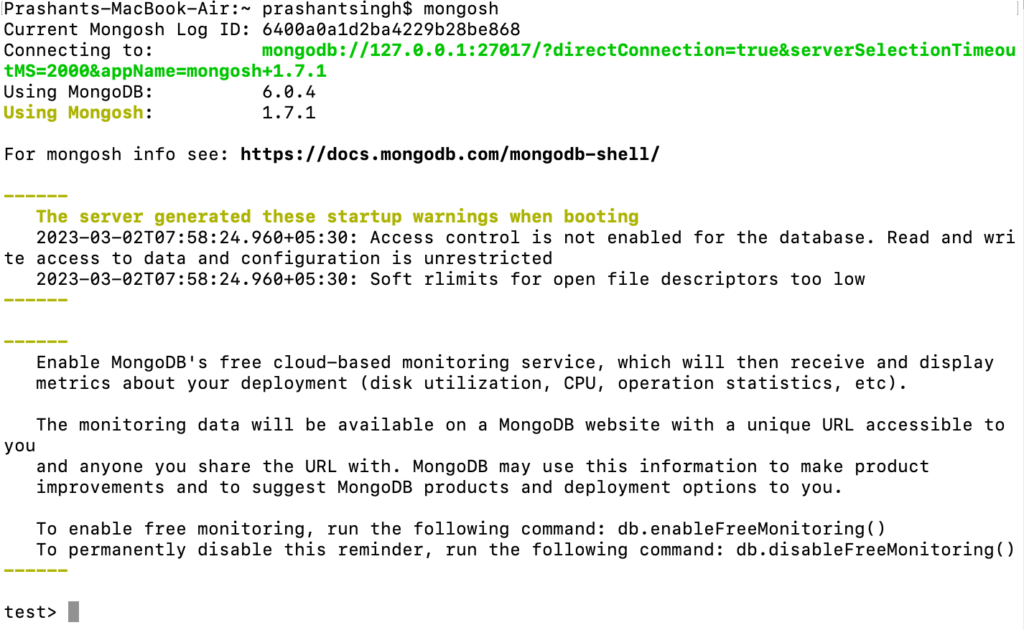
6. The last command – Open the mongo shell

mongosh

This is how it looks like when your mongo shell is up and running

Screenshot 2023 03 02 at 6.42.28 PM

Also Read: Typescript Technical Interview Questions 2023 – Part 1

CRUD Operations

How to create a database in MongoDB?

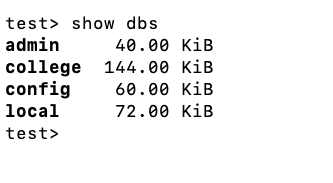
1. show all databases

show dbs
Screenshot 2023 03 01 at 5.56.00 PM

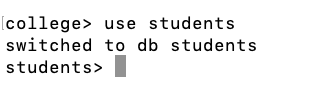
2. create database if not exist and switch to this database

use students
Screenshot 2023 03 01 at 6.05.08 PM

How to create a collection in MongoDB?

3. creating a collection and adding data to the collection

db.students.insertOne({})
Screenshot 2023 03 01 at 6.08.14 PM

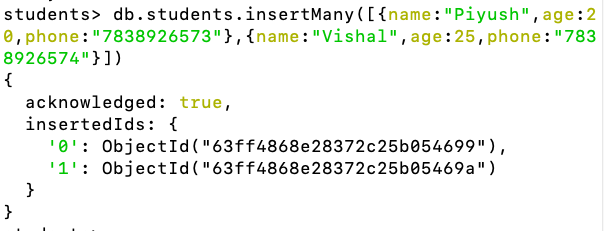
4. Insert multiple records at once

db.students.insertMany([{},{}])
Screenshot 2023 03 01 at 6.14.35 PM

How to list all records in a collection?

5. list all the records of this collection

db.students.find()
Screenshot 2023 03 01 at 6.27.45 PM

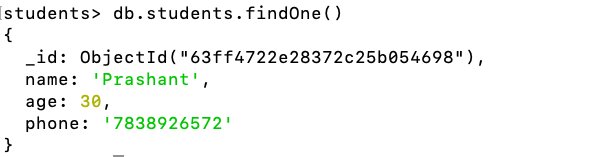
6. Return only 1st record of the collection

db.students.findOne()
Screenshot 2023 03 01 at 6.18.55 PM

Also Read: How to setup Visual Studio Code as a copy of PhpStorm

How to search for a record in a collection?

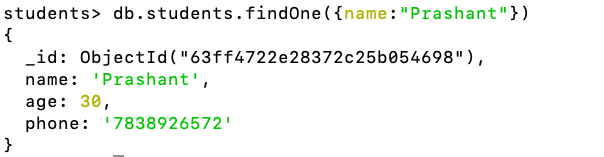
7. Search the collection for name == Prashant and return only 1st record of the collection

db.students.findOne({name:"Prashant"})
Screenshot 2023 03 01 at 6.21.50 PM

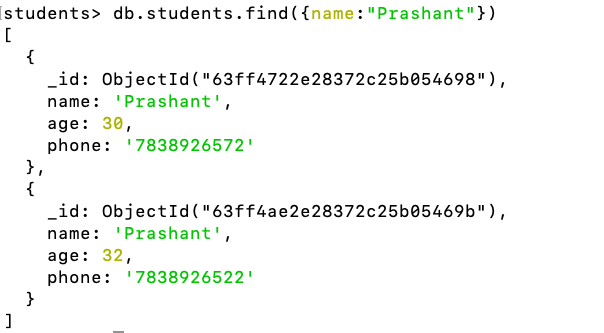
8. Search the collection for name == Prashant and return all matching records of the collection

db.students.find({name:"Prashant"})
Screenshot 2023 03 01 at 6.24.11 PM

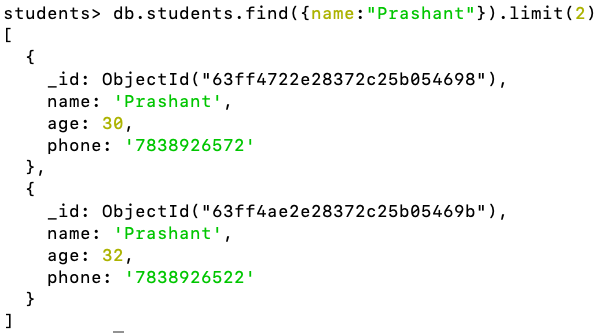
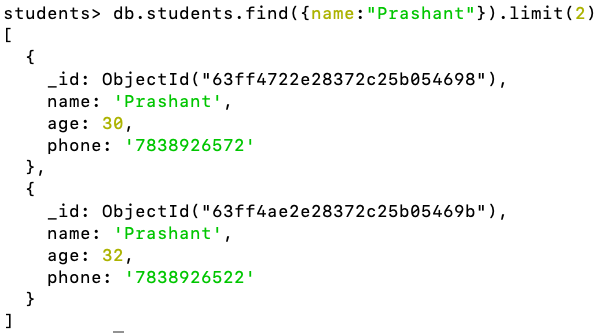
9. Search the collection for name == Prashant and return only 2(whatever the limit) matching records of the collection

db.students.find({name:"Prashant"}).limit(2)
Screenshot 2023 03 01 at 6.27.45 PM 1

How to update a record in MongoDB?

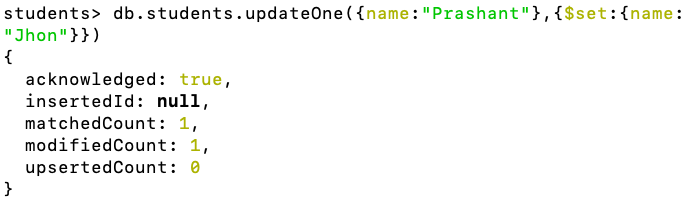
10. Update the first record. Search for name == Prashant and update it to Jhon.

db.students.updateOne({name:"Prashant"},{$set:{name:"Jhon"}})
Screenshot 2023 03 01 at 6.31.03 PM

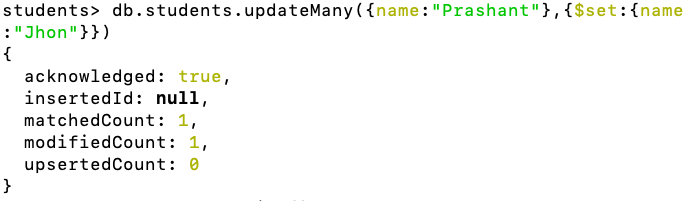
11. Update all matching records. Search for name == Prashant and update it to Jhon.

db.students.updateMany({name:"Prashant"},{$set:{name:"Jhon"}})
Screenshot 2023 03 01 at 6.34.17 PM

How to delete a record in MongoDB?

12. Delete 1st matching records. Search for name == Jhon and delete the 1st record

db.students.deleteOne({name:"Jhon"})
Screenshot 2023 03 01 at 6.38.14 PM

How to delete all records in a collection?

13. Delete all matching records. Search for name == Jhon and delete all matching records

db.students.deleteMany({name:"Jhon"})
Screenshot 2023 03 01 at 6.39.51 PM

14. Delete all records. Make the collection empty

db.students.deleteMany({})

Also Read: Top 10 Python Skills to Make Money in 2023

TODO Next

  • Find by id
  • Update by id
  • Delete by id
  • Install Mongo Compass and perform the same operations

Laravel 10 Image Compression And Optimization Guide 2024

Overview

Laravel Image compression project is used to compress any image to a smaller size while maintaining the quality of the image. It is generally used to make images of almost the same resolution with smaller sizes so that the web page looks good and loads quickly as the more prominent images take time to load.


Architecture

For this project, I will be using the Laravel PHP framework as it provides a robust set of tools and features for building web applications. I am going to use a package spatie/image-optimizer which is helpful in image compression.

To store the images, I will be saving them in the project directory itself but you can use Amazon S3, which is a scalable and secure cloud storage service. Using S3 will allow you to easily store and retrieve images without having to worry about managing your own storage infrastructure.

To handle the user interface, I will be using Bootstrap, a popular front-end framework that provides a set of pre-designed UI components that we can use to build a responsive and user-friendly interface.


Steps To Implement

  • Create a Laravel project using the following command:
composer create-project --prefer-dist laravel/laravel image-compress-project
  • Install the spatie/image-optimizer Image package using Composer:
composer require spatie/image-optimizer

Optimization tools

  • The package will use these optimizers if they are present in your system:
  • JpegOptim
  • Optipng
  • Pngquant 2
  • SVGO 1
  • Gifsicle
  • cwebp
  • Here’s how to install all the optimizers on Ubuntu:
sudo apt-get install jpegoptim
sudo apt-get install optipng
sudo apt-get install pngquant
sudo npm install -g svgo@1.3.2
sudo apt-get install gifsicle
sudo apt-get install webp
  • And here’s how to install the binaries on MacOS (using Homebrew):
brew install jpegoptim
brew install optipng
brew install pngquant
npm install -g svgo@1.3.2
brew install gifsicle
brew install webp
  • And here’s how to install the binaries on Fedora/RHEL/CentOS:
sudo dnf install epel-release
sudo dnf install jpegoptim
sudo dnf install optipng
sudo dnf install pngquant
sudo npm install -g svgo@1.3.2
sudo dnf install gifsicle
sudo dnf install libwebp-tools

Also Read: Learn How to Use the Slack API to Post Messages in Slack Channel Using Laravel


  • Create a controller to handle the image compression logic using the following command:
php artisan make:controller CompressController
  • In the CompressController class, create 2 methods index() and compress() to load the upload image form and to resize & save the image respectively:
use Exception;
use Illuminate\Http\Request;
use Illuminate\Support\Facades\Validator;
use Spatie\ImageOptimizer\OptimizerChainFactory;

class CompressController extends Controller
{
    public function index()
    {
        return view('image-optimizer');
    }

    public function compress(Request $request)
    {
       // Validate the image for acceptable image formats and max upload size(Max upto 5MB)
        $validator = Validator::make(
            $request->all(),
            [
                'image' => 'required|file|mimes:jpeg,jpg,png,gif,svg,webp|max:5120',
            ]
        );
        if($validator->fails()){
            return redirect()->back()->withErrors($validator->errors())->withInput();
        }

        try{
            // Get the uploaded image from the request
            $image = $request->file('image');

            // Generate a unique filename for the uploaded image
            $imagename = time().'.'.$image->getClientOriginalExtension();
            
            // Set the path to save the original image
            $imagepath = public_path('/images/');
            
            // Set the path to save the compressed image
            $pathToOutput = public_path('/optimizedImage/');

            // Save the original image
            $image->move($imagepath, $imagename);

            // Compress image and save it to optimizedImage path using Spatie's OptimizerChainFactory 
            $optimizerChain = OptimizerChainFactory::create();
            $optimizerChain->optimize($imagepath.$imagename,$pathToOutput.$imagename);

            // Delete the original image
            unlink($imagepath.$imagename);

            // Redirect back to image uploader with success message.
            return back()->with('success', 'Image compressed successfully.');
        }
        catch(Exception $e)
        {
            // Redirect back to image uploader with error message.
            $error = 'Opps! something goes wrong. Please try later';
            return redirect()->back()->with('error',$error)->withInput();
        }
    }
}

Let’s break down each part of the compress() function:

  1. The compress() function takes a Request object as its argument. This object contains the uploaded image that we want to compress.
  2. We get the uploaded image from the request using the file() method.
  3. We generate a unique filename for the uploaded image using the current timestamp and the original file extension.
  4. We set the path where we are going to save the original image. In this case, we save it to the public/images directory.
  5. We set the path where we want to save the compressed image. In this case, we save it to the public/optimizedImage directory.
  6. We use the spatie/ImageOptimizer package to compress the image. We first create an instance of OptimizerChainFactory::create(). By using this instance, compress and save the original image. Finally, we remove the original image(uncompressed one) from its original path.
  7. If the image is compressed successfully, we return a success message to the user.

  • Create image-optimizer.blade.php file inside resources->views. Create a form to upload the image:
<div class="container" style="margin-top: 50px;">
    @if (session('success'))
        <div class="alert alert-success">
            {{ session('success') }}
        </div>
    @endif
    <h2>Compress JPEG</h2>
    <form action="{{ url('compress') }}" method="post" enctype="multipart/form-data">
        @csrf
        <div class="form-group">
            <input type="file" name="image" class="form-control" required>
        </div>
        <button type="submit" class="btn btn-primary">Compress</button>
    </form>
</div>
  • Add the following routes in routes/web.php:
// Show image upload form
Route::get('/image-optimizer', [ImageController::class, 'index']);
// Compress and save image in folder
Route::post('/compress', [ImageController::class, 'compress']);
  • Run the project using the following command:
php artisan serve

This implementation will allow us to generate a newly resized image and store it in the thumbnail folder.


Also Read: How To Setup Real-Time Synchronization using WebSocket Connection with Laravel 11, Pusher, & Angular 18?


Assumptions

  • For this project, I am assuming that the images being uploaded are not too large for the server to handle, and that we are only concerned with resizing images that are within a reasonable size range. If we need to resize very large images, we may need to consider using a distributed image processing system such as Apache Spark or Apache Flink.
  • The target server is running PHP 7.4 or higher.

Also Read: Create Short URL Hashing & Tracking Project in 10 Minutes: Step By Step Guide


Deployment

Assuming you have a server with PHP and a web server (such as Apache or Nginx) installed, you can deploy the Image resizing project using the following steps:

  1. Copy the contents of the image-resizing directory to your server.
  2. Configure your web server to serve the contents of the public directory as the document root.
  3. Set the necessary environment variables on the server.


FAQs

Website loading slow because of slow images?

Yes! Large images can significantly slow down your website. This guide explains how to use Laravel to compress images, making your website load faster and offering a better user experience for visitors.

Mobile website slow? Try image optimization!

Absolutely! Image optimization is crucial for mobile websites. This guide shows you how to compress images using Laravel, ensuring your website loads quickly on all devices, including mobiles.

Does image compression affect quality?

Yes, but with the right techniques, the impact can be minimal. This guide explains how to compress images in Laravel while maintaining a good balance between quality and size.

Are there free image compression tools available?

Yes, there are many free image compression tools online. However, integrating compression directly into your website using Laravel offers more control and security.

How can I implement image compression on my website myself?

This guide provides a step-by-step explanation of how to implement image compression in your Laravel project. No prior experience is required, and the code examples are easy to follow.

Will this method work for my existing images?

Yes! This method can be used to compress both new and existing images on your website. You can compress them in bulk or one by one, depending on your needs.

Will the quality difference in compressed images be noticeable?

In most cases, the quality difference in compressed images won’t be noticeable to the naked eye. This guide shows you how to achieve optimal compression with minimal quality loss.

Can image compression improve my SEO ranking?

Yes! Faster loading websites tend to rank higher in search results. By compressing images and improving website speed, you can potentially boost your SEO ranking.


TODO Next

  • Resize & C the image to Medium size i.e. 1024px width and use this image to further resize it to thumbnail size i.e. 240px

Conclusion

This blog post has explored image compression techniques and explained how to implement them in your Laravel project. By optimizing images, you can significantly improve website loading speed, enhance user experience, and potentially benefit your SEO ranking.