

How To Read Emails Using Microsoft Graph API In Laravel 12?

Last updated: Aug 04, 2026. Written for Laravel 12 and tested on Laravel 13, PHP 8.2+, and version 3 of the official Microsoft Graph PHP SDK.
Outlook now serves more than 400 million users worldwide, and for every one of them, Basic Authentication is already gone. Microsoft removed it for IMAP, POP, and the other mail protocols, so the old username-and-password approach to reading a mailbox in code simply stops working, according to Microsoft’s Basic Authentication deprecation notice and ElectroIQ’s Outlook usage statistics (both retrieved 2026-08-04). The supported path now runs through the Microsoft Graph API and OAuth.
This guide walks through that path in Laravel: registering an app in Microsoft Entra ID, sending the user through the Microsoft login, and then reading, filtering, and saving their emails. The original version of this tutorial used the old raw-URL SDK and referenced Azure AD by its former name. Everything below is the current, working version.
Key Takeaways
- Reading Outlook or Exchange mail from Laravel now requires OAuth through Microsoft Graph. Basic Auth was retired for mail protocols, so there is no supported password-based fallback (Microsoft Learn, 2026).
- The current package is
microsoft/microsoft-graphversion 3, which needs PHP 8.2 or later and uses a fluent request API instead of raw URL strings (Packagist, 2026).- Use the
Mail.Readpermission: the delegated version when a signed-in user reads their own mailbox, and the application version when a background job reads a mailbox with nobody logged in (Microsoft Graph permissions reference).
What Do You Need Before You Start?
You need three things in place before writing any code: a Laravel project on a supported version, an app registered in Microsoft Entra ID with the right permission, and a working understanding of the OAuth authorization-code flow. Each one is short, and skipping any of them is where most people get stuck later.
A Laravel project on a current version
Any actively supported Laravel release works. Laravel 12 shipped on February 24, 2025, and Laravel 13 is the latest stable release as of mid-2026, according to Laravel News (retrieved 2026-08-04). The Graph SDK is what sets the real floor here, because it requires PHP 8.2 or later.
Access to the Microsoft Graph API
You need a Microsoft 365 or Outlook account and permission to register an application in your Microsoft Entra ID tenant. Entra ID is the current name for what used to be called Azure Active Directory; Microsoft renamed it in July 2023, and the APIs themselves did not change.
A working grasp of OAuth
Reading someone’s mailbox means asking their permission first. That is what OAuth does. The user is redirected to Microsoft, approves the request, and Microsoft hands your app a token it can use to call the Graph API on that user’s behalf. You do not need to memorize the spec, but you should recognize the round trip.
How Do You Register the App in Microsoft Entra ID?
Every Graph API call is tied to a registered application, so this is the first real step. In the Microsoft Entra admin center, open App registrations, create a new registration, and set the redirect URI to a route in your Laravel app (for example, https://yourapp.test/graph/callback). Microsoft’s app registration quickstart covers the screen-by-screen version if you have never done it.
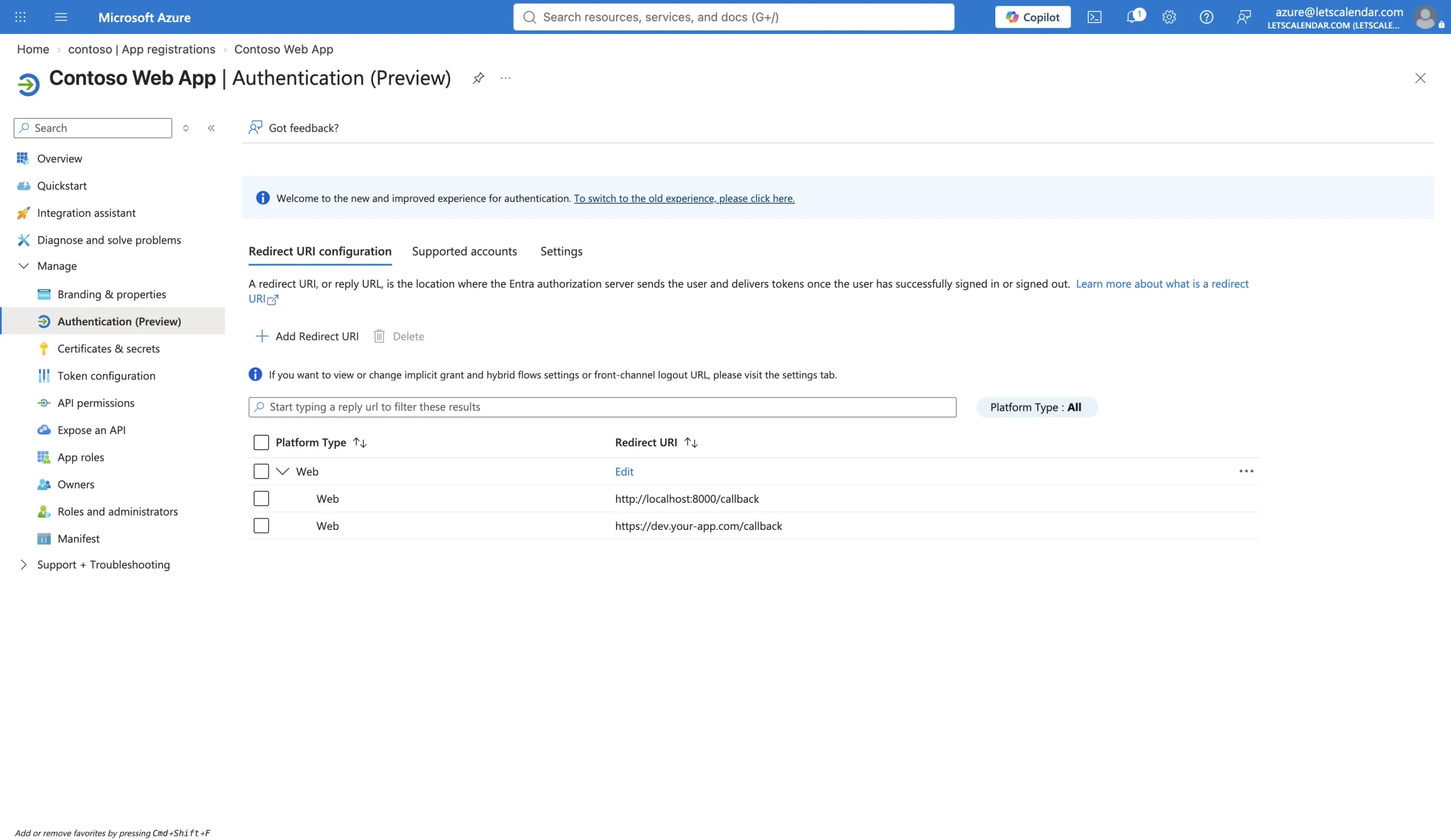
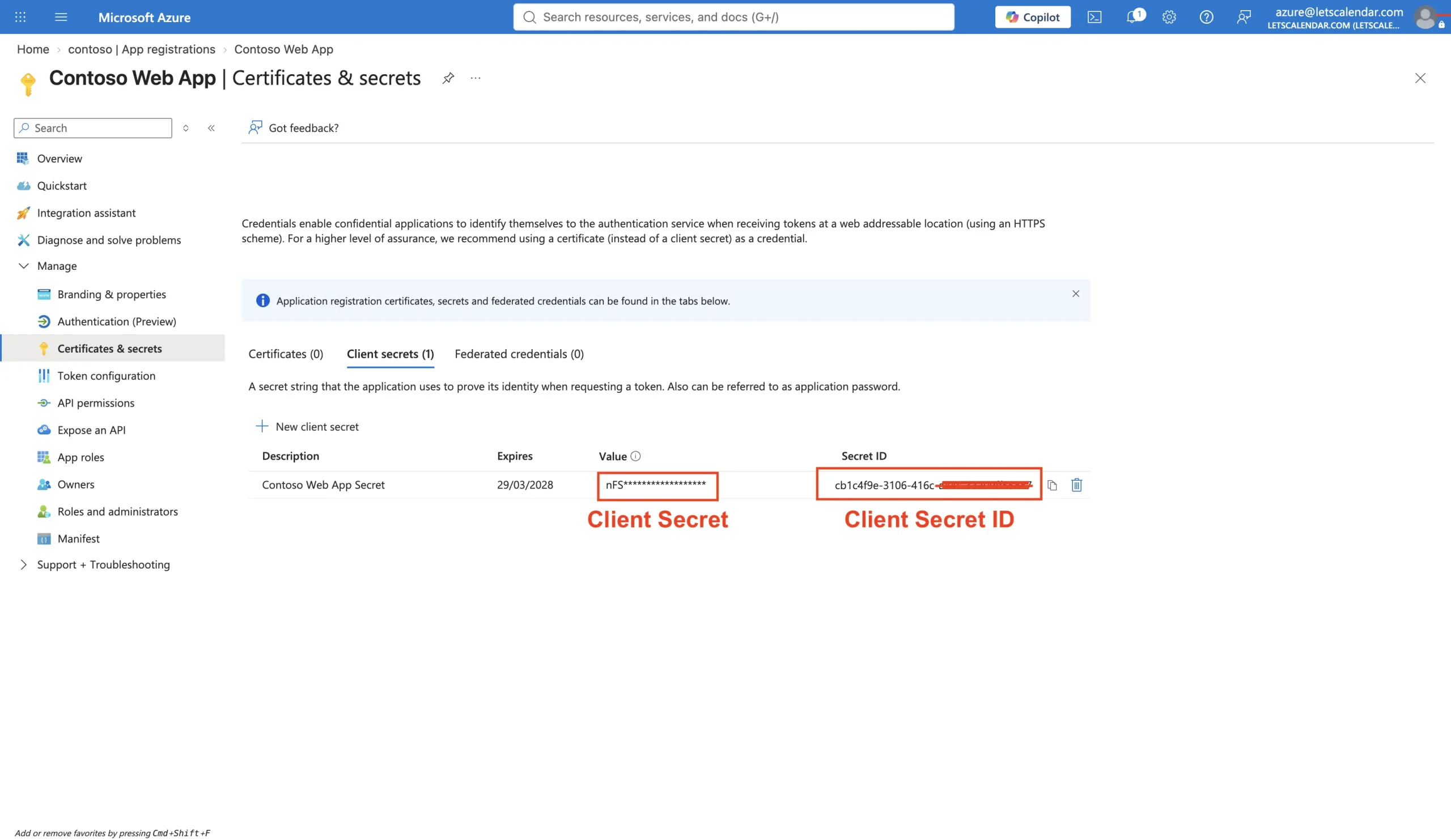
Once the app exists, note its Application (client) ID and Directory (tenant) ID from the overview page. Then create a client secret under Certificates & secrets and copy the value immediately, because Microsoft only shows it once.
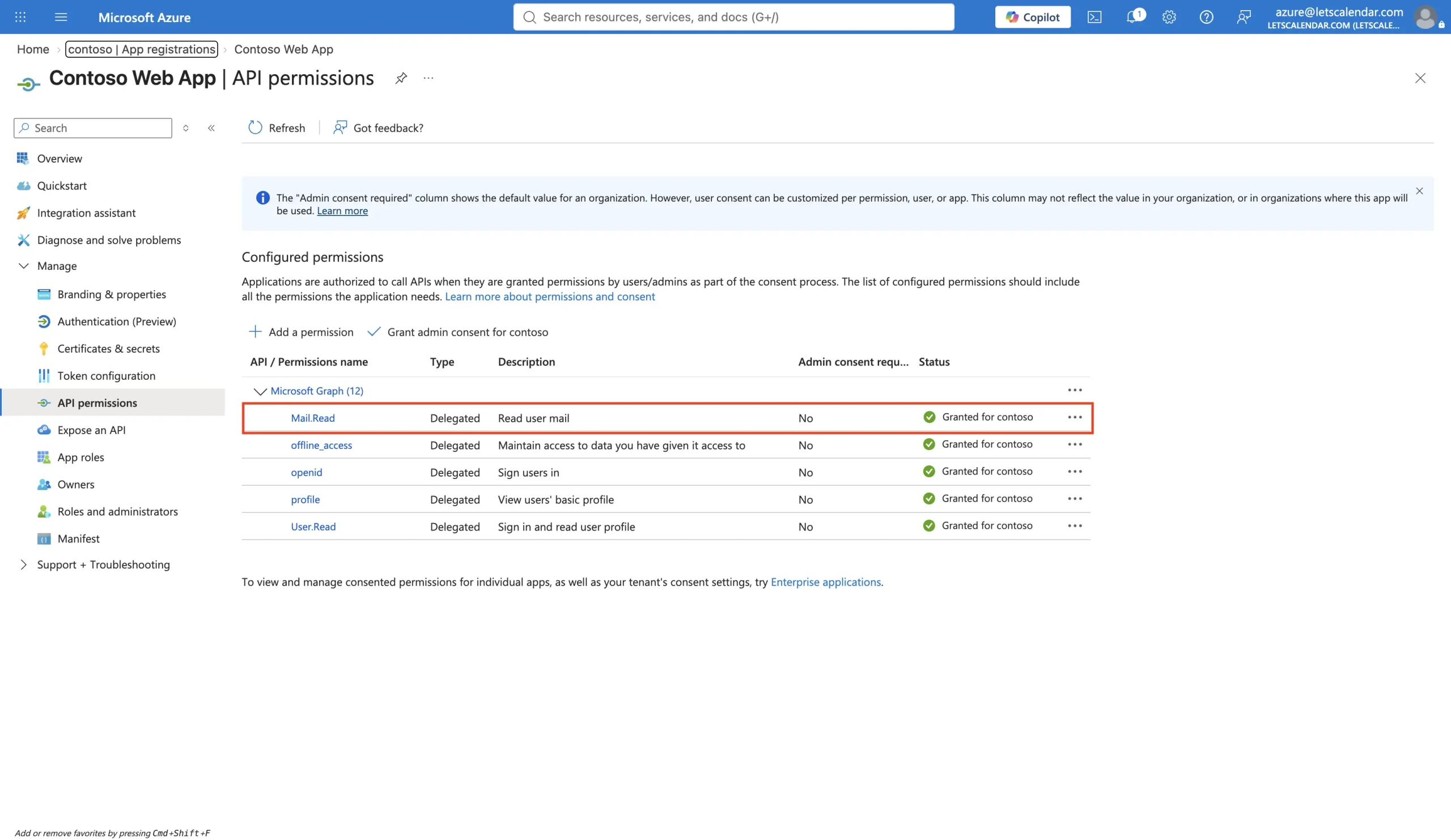
Last, open API permissions, choose Microsoft Graph, and add the Mail.Read permission. For a signed-in user reading their own inbox, add the delegated version. The section further down on delegated versus application permissions explains when you would pick the other one.
Store the three values in your .env file rather than in code:
GRAPH_CLIENT_ID=your-application-client-id
GRAPH_CLIENT_SECRET=your-client-secret-value
GRAPH_TENANT_ID=your-directory-tenant-id
GRAPH_REDIRECT_URI=https://yourapp.test/graph/callback
Then reference them through config/services.php:
// config/services.php
'graph' => [
    'client_id'     => env('GRAPH_CLIENT_ID'),
    'client_secret' => env('GRAPH_CLIENT_SECRET'),
    'tenant'        => env('GRAPH_TENANT_ID'),
    'redirect'      => env('GRAPH_REDIRECT_URI'),
],
Also Read: How to send notification to Microsoft Teams from Laravel?
How Do You Install the Microsoft Graph SDK?
Install the official SDK with Composer. It pulls in the Kiota authentication packages you need for the OAuth contexts, so this one line is enough:
composer require microsoft/microsoft-graph
As of July 2026, the current stable release is version 3, and it requires PHP 8.2 or later, according to the package listing on Packagist (retrieved 2026-08-04). If you are upgrading an older integration, this is a major version jump, and the request syntax changed completely. The fetch section below shows the difference.
How Do You Redirect the User to the Microsoft Login?
The first route builds the Microsoft authorization URL and sends the user there. You are asking for two scopes that matter: Mail.Read to read the mailbox, and offline_access so Microsoft also returns a refresh token. The state value is a random string you check on the way back to protect against request forgery.
// app/Http/Controllers/GraphController.php
use Illuminate\Http\Request;
use Illuminate\Support\Str;

public function redirect()
{
    $state = Str::random(40);
    session(['graph_oauth_state' => $state]);

    $query = http_build_query([
        'client_id'     => config('services.graph.client_id'),
        'response_type' => 'code',
        'redirect_uri'  => config('services.graph.redirect'),
        'response_mode' => 'query',
        'scope'         => 'offline_access User.Read Mail.Read',
        'state'         => $state,
    ]);

    $tenant  = config('services.graph.tenant');
    $authUrl = "https://login.microsoftonline.com/{$tenant}/oauth2/v2.0/authorize?{$query}";

    return redirect()->away($authUrl);
}
When the user clicks through, Microsoft shows them a consent screen listing exactly what your app is asking for. Nothing reaches your app until they approve.
How Do You Handle the Login Callback?
Microsoft redirects back to your callback route with a code in the query string. You verify the state, then hand the code to the SDK’s AuthorizationCodeContext, which exchanges it for tokens and becomes the authentication behind your Graph client. In version 3 of the SDK you no longer wire up a separate OAuth library for this.
use Illuminate\Http\Request;
use Microsoft\Graph\GraphServiceClient;
use Microsoft\Kiota\Authentication\Oauth\AuthorizationCodeContext;

public function callback(Request $request)
{
    abort_if(
        $request->input('state') !== session('graph_oauth_state'),
        403,
        'Invalid OAuth state.'
    );

    $tokenContext = new AuthorizationCodeContext(
        config('services.graph.tenant'),
        config('services.graph.client_id'),
        config('services.graph.client_secret'),
        $request->input('code'),
        config('services.graph.redirect')
    );

    $graph = new GraphServiceClient($tokenContext, ['Mail.Read']);

    // Store the context so later requests can reuse it without a fresh login.
    session(['graph_token_context' => serialize($tokenContext)]);

    return redirect()->route('emails.index');
}
The GraphServiceClient you just built is the object you call for everything else. Hold on to the token context, because the SDK uses it to refresh the access token automatically when it expires, as long as you requested offline_access.
How Do You Fetch and Filter Emails With the Graph API?
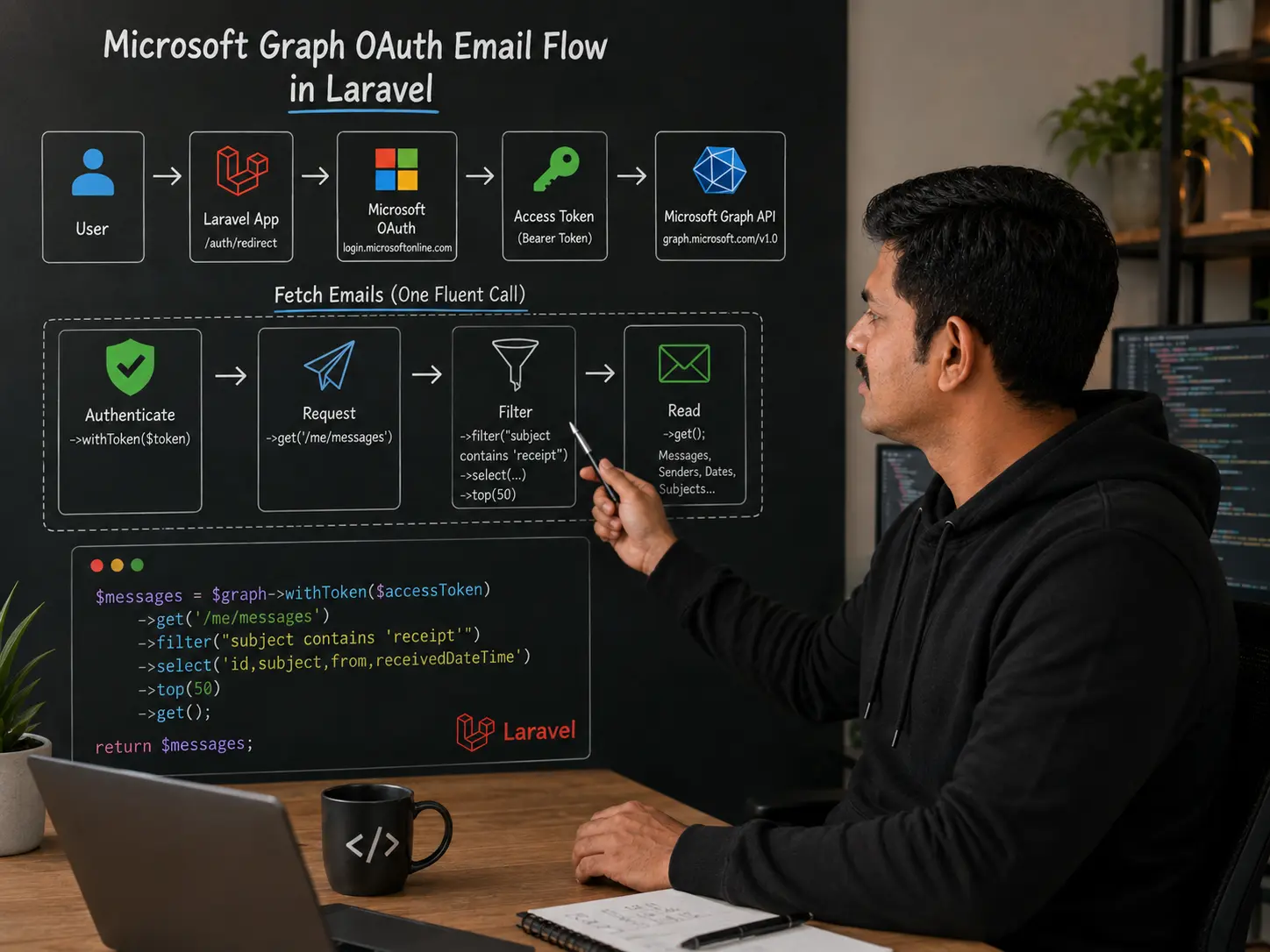
Reading messages is a single fluent call on the Graph client: $graph->me()->messages()->get()->wait(). If you followed an older version of this tutorial, this is the part that changed the most. The SDK used to build requests from raw URL strings, and that style is gone.
// Old style (SDK version 1, no longer supported)
$messages = $graph->createRequest('GET', '/me/messages')
    ->setReturnType(Model\Message::class)
    ->execute();

// Current style (SDK version 3)
$messages = $graph->me()->messages()->get()->wait();
In practice you rarely want the whole mailbox. You want specific fields, a filter, and a sensible order. The request configuration object handles all three. Here is a fetch that pulls the 25 most recent messages whose subject contains the word “receipt,” selecting only the fields you actually need:
use Microsoft\Graph\GraphServiceClient;
use Microsoft\Graph\Generated\Me\Messages\MessagesRequestBuilderGetRequestConfiguration;
use Microsoft\Graph\Generated\Me\Messages\MessagesRequestBuilderGetQueryParameters;

public function index()
{
    $tokenContext = unserialize(session('graph_token_context'));
    $graph = new GraphServiceClient($tokenContext, ['Mail.Read']);

    $config = new MessagesRequestBuilderGetRequestConfiguration();
    $config->queryParameters = new MessagesRequestBuilderGetQueryParameters();
    $config->queryParameters->select  = ['subject', 'from', 'receivedDateTime', 'bodyPreview'];
    $config->queryParameters->filter  = "contains(subject,'receipt')";
    $config->queryParameters->top     = 25;
    $config->queryParameters->orderby = ['receivedDateTime DESC'];

    $response = $graph->me()->messages()->get($config)->wait();

    foreach ($response->getValue() as $message) {
        $subject  = $message->getSubject();
        $sender   = $message->getFrom()->getEmailAddress()->getAddress();
        $received = $message->getReceivedDateTime()->format('Y-m-d H:i');
        // Save, convert to PDF, or store however your workflow needs.
    }

    return view('emails.index', ['messages' => $response->getValue()]);
}
Always query the v1.0 Graph endpoint for production work, which is what the SDK does by default. Microsoft’s beta endpoint exists for previewing new features and is explicitly not supported in production, according to the list messages reference (retrieved 2026-08-04).
How Do You Page Through a Large Mailbox?
Graph returns messages in pages, ten at a time by default, and up to 1,000 when you set $top, according to the list messages reference (retrieved 2026-08-04). If you only read the first page, you silently miss everything after it. This is the single most common bug in mailbox integrations, and none of the competing tutorials mention it.
The SDK ships a PageIterator that follows the @odata.nextLink for you, so you process every message across every page without managing the paging by hand:
use Microsoft\Graph\Core\Tasks\PageIterator;
use Microsoft\Graph\Generated\Models\Message;

$response = $graph->me()->messages()->get($config)->wait();

$iterator = new PageIterator($response, $graph->getRequestAdapter());

$iterator->iterate(function (Message $message) {
    // Runs once per message across all pages.
    // Return false at any point to stop early.
    return true;
});
For a workflow that runs on a schedule and only cares about new mail, look at the /me/messages/delta endpoint instead. It returns a token you store and reuse, so each run pulls only what arrived since the last one rather than re-reading the whole folder.
Delegated or Application Permission: Which Do You Need?
This is the decision that trips up most real projects, and it comes down to one question: is a human signed in at the moment the code runs? Delegated permission acts on behalf of a logged-in user. Application permission acts as the app itself, with no user present, which is what you need for a scheduled job or a queue worker reading a shared mailbox at 2 a.m.
Delegated (Mail.Read, delegated) | Application (Mail.Read, application) | |
|---|---|---|
| Who is present | A signed-in user | Nobody, the app runs on its own |
| Whose mail it reads | The signed-in user’s mailbox | Any mailbox you name |
| Consent | The user approves | An admin approves once |
| Auth context | AuthorizationCodeContext | ClientCredentialContext |
| Best for | A user reading their own inbox in a web app | Background jobs, cron, queue workers |
The application flow skips the whole login redirect. You build the client from a client-credential context and name the mailbox directly, because there is no “me” when no user is signed in:
use Microsoft\Graph\GraphServiceClient;
use Microsoft\Kiota\Authentication\Oauth\ClientCredentialContext;

$tokenContext = new ClientCredentialContext(
    config('services.graph.tenant'),
    config('services.graph.client_id'),
    config('services.graph.client_secret')
);

$graph = new GraphServiceClient($tokenContext);

$response = $graph->users()
    ->byUserId('[email protected]')
    ->messages()
    ->get()
    ->wait();
Application permissions are powerful, so grant them narrowly. If a background job only needs to read one shared mailbox, scope its access to that mailbox rather than granting tenant-wide read on every inbox.
How Do You Refresh the Access Token?
Access tokens expire after about an hour. Because you requested the offline_access scope during login, Microsoft also returned a refresh token, and the SDK’s token context uses it to get a new access token automatically when the old one lapses. You do not call a refresh endpoint by hand.
What you do need to handle is persistence. If you store the token context (as the callback above does) and rebuild the client from it on later requests, refresh keeps working across the user’s session. For long-running background access where a user’s refresh token would eventually expire anyway, the application-permission flow is the more reliable choice, since it mints a fresh token from the client secret every time it runs.
Frequently Asked Questions
I am new to Laravel. Can I still follow this tutorial?
Yes. If you can create a controller and a route and run a Composer command, you can complete this. The Graph-specific parts are the OAuth redirect and the fluent SDK calls, and both are copy-ready above. Start with a fresh Laravel install so nothing else gets in the way.
What if I do not have a Laravel project set up yet?
Create one with composer create-project laravel/laravel graph-mail, then follow along from the prerequisites section. Any actively supported Laravel version works, as long as your PHP is 8.2 or later for the Graph SDK.
What permission do I actually need to read email?
You need Mail.Read. Use the delegated version when a signed-in user is reading their own mailbox, and the application version when a background process reads a mailbox with no user present, according to the Microsoft Graph permissions reference.
Do I still need thephpleague/oauth2-client?
No. Older guides paired that library with the SDK, but version 2 and later of microsoft/microsoft-graph ship their own authentication contexts, so composer require microsoft/microsoft-graph is all you need for the flow shown here.
My requests suddenly return a 429 error. What is that?
That is Graph throttling you for sending too many requests too quickly. The response includes a Retry-After header telling you how many seconds to wait. Respect it, add a short backoff between calls, and select only the fields you need so each request stays light.
Can I filter emails by more than the subject line?
Yes. The filter query parameter supports fields like from, receivedDateTime, isRead, and hasAttachments. For full-text matching across the body, use the search parameter instead of filter.
What else can I do with the Graph API from here?
The same client reads calendars, contacts, files in OneDrive, Teams messages, and more. Once the authentication is in place, you are calling different fluent methods on the same GraphServiceClient.
Wrapping Up
Reading email in Laravel is no longer a matter of plugging in a username and password, and that is a good thing. Basic Auth is gone for mail protocols, and the Microsoft Graph API with OAuth gives you scoped, revocable, auditable access instead. Register the app in Entra ID, pick the right Mail.Read variant for whether a user is present, and let version 3 of the SDK handle the requests with its fluent API.
The parts worth getting right are the ones the shorter tutorials skip: paginating past the first ten messages, and choosing delegated versus application permission before you write the code rather than after it breaks in production.
Need a senior Laravel developer to build or untangle a Microsoft Graph integration? Message me on WhatsApp and tell me what you are building.
Sources
- Microsoft Learn, “Deprecation of Basic authentication in Exchange Online,” retrieved 2026-08-04
- Microsoft Learn, “List messages (Microsoft Graph REST API v1.0),” retrieved 2026-08-04
- Microsoft Learn, “Microsoft Graph permissions reference,” retrieved 2026-08-04
- Microsoft Learn, “Quickstart: Register an application with the Microsoft identity platform,” retrieved 2026-08-04
- Packagist, “microsoft/microsoft-graph,” retrieved 2026-08-04
- Laravel News, “Laravel 12 release date,” retrieved 2026-08-04
- ElectroIQ, “Outlook Statistics 2025,” retrieved 2026-08-04